AI Employment Contract Generator vs Templates: Which Is Better?
Downloaded templates are static, dated, and rarely match your role or jurisdiction. An AI employment contract generator drafts a jurisdiction-aware starting point in minutes, places signature fields automatically, and still leaves room for the legal review real employment matters deserve.
Why employment contracts matter more than most paperwork
An employment contract is one of the few documents a small business signs that keeps working long after the ink dries. It sets pay, hours, duties, probation length, notice periods, and what happens if the relationship ends badly — all before either side has a reason to argue about any of it. Verbal agreements and a friendly handshake feel fine on day one, but they leave nothing to point to on day two hundred when a dispute over overtime, a data breach after resignation, or a disagreement about role scope shows up instead.
For the employer, a clear contract is protection: it defines what the business can reasonably expect, what confidential information and intellectual property belong to the company, and how termination works if performance or conduct becomes a problem. For the employee, the same document is reassurance — proof of agreed pay, entitlements, and conditions that cannot quietly shift because a manager remembers the conversation differently six months later. Good contracts reduce disputes precisely because they remove ambiguity from the parts of the relationship most likely to get contested.
Regulators and courts also treat the written contract as the primary evidence when something goes wrong. Unfair dismissal claims, wage disputes, and restraint-of-trade arguments are decided largely on what the document actually says, not on what either party assumed. A business that treats the employment contract as a formality to get out of the way is, in practice, gambling that no dispute will ever test the gaps. Small businesses that scale past a handful of hires usually learn this the expensive way — after the first contested termination, not before it.
Contracts also do quiet, everyday work that has nothing to do with disputes. A new hire who can read exactly what their probation period involves, when their first pay review is due, and what happens if the business needs to change their hours settles into a role faster than one working from verbal assurances they cannot easily revisit. Clarity at the start of a working relationship reduces the small frictions — "wait, did we agree to that?" — that otherwise accumulate into genuine mistrust over the first few months of employment.
None of this means every hire needs a bespoke twenty-page agreement drafted from scratch. Most SMB roles are well served by a solid, jurisdiction-appropriate base contract with the specific details filled in correctly — job title, pay, hours, probation, notice, and the handful of clauses that matter for that business (confidentiality, IP assignment, restraint where enforceable, and how variations are handled). The problem is not that a good base contract is hard to write once. It is that most small businesses end up rewriting the same mistakes into every new hire because the base document was never quite right to begin with.
The cost of getting this wrong rarely shows up immediately. It shows up eighteen months later, when an employee who was never given a written contract disputes their notice entitlement, or when a departing staff member argues their non-compete clause was never properly explained because the document they signed was a vague one-pager assembled in a hurry before their first day. Legal fees to defend even a straightforward unfair dismissal claim can run into thousands of dollars, and a large share of those disputes trace back to a contract that was ambiguous, missing, or simply wrong for the role — a cost that dwarfs the twenty minutes it would have taken to get the document right at the start.
The problems with downloading random templates
A quick search for "employment contract template" returns thousands of free downloads from law firm marketing pages, generic business-forms sites, and forum attachments of unknown age. Some are genuinely well drafted. Many are years out of date, written for a different jurisdiction than the one you operate in, or stripped of the clauses that made the original version useful in the first place — because someone deleted a paragraph they did not understand and never noticed the reference that followed it no longer made sense.
The bigger issue is fit. A template built for a UK limited company does not carry across cleanly to an Australian small business subject to the National Employment Standards and modern awards, and a template written for at-will US employment assumes a legal default that most other countries do not share at all. Even within one country, a casual retail template does not fit a salaried professional role, and a template written for full-time staff often mishandles part-time or fixed-term arrangements — the clauses that matter most (notice, overtime, leave accrual) are exactly the ones most likely to be wrong when the template does not match the role.
Formatting is the quieter cost. A downloaded Word document usually needs reformatting to match your letterhead, editing to insert the right names and dates without breaking numbering, and then — separately — printing, scanning, or re-uploading into a completely different tool just to collect a signature. Multiply that by every new hire and the "free" template starts costing real admin hours, plus the risk that someone forgets to update a clause across every copy once a mistake is found in one of them.
Version control is the problem nobody budgets for. Six months after the first hire, there are usually three slightly different copies of "the contract" floating around different inboxes, each edited by a different person for a different reason, and nobody is fully sure which one is current. When a dispute eventually surfaces, the business discovers it cannot even confidently produce the version the employee actually signed — a bad position to be in regardless of how the underlying clauses read.
None of this is really an argument against templates as a concept. A well-maintained, jurisdiction-correct base document is genuinely useful. It is an argument against sourcing that base document from an anonymous download and trusting it to still be accurate, complete, and appropriate for the specific role you are hiring for — three assumptions that free templates rarely earn.
Many free template pages exist primarily to capture search traffic for a law firm or software vendor rather than to provide a genuinely current legal document, and the download itself is sometimes an afterthought behind the lead-generation form in front of it. That does not make every free template dangerous, but it does mean the incentive of the page hosting it is not always "give you the most accurate document possible" — it is "get you to submit your email address," which is a different priority than the one that actually protects your business.
What AI-generated contracts actually do well
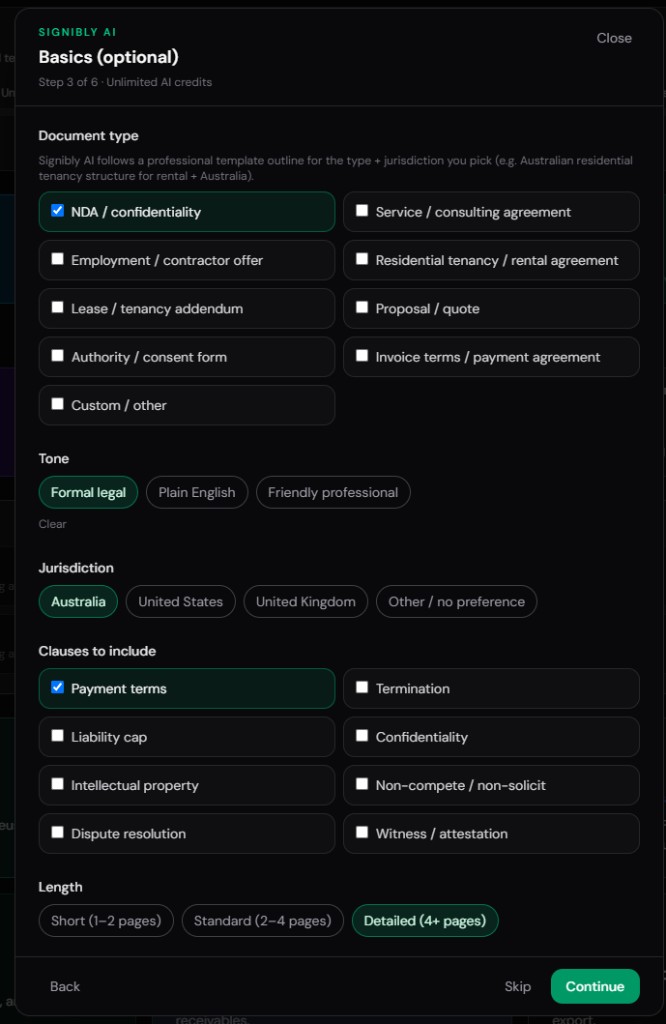
AI contract generators solve a narrower problem than "replace a lawyer," and that narrower framing is exactly why they work. Instead of copying a static file and hoping it fits, you answer a short set of structured questions — role type, employment basis (full-time, part-time, casual, fixed-term), jurisdiction, probation length, notice period, and any specific clauses you need — and the system assembles a draft from that context rather than from a single generic file written for nobody in particular.
The output tends to be more internally consistent than a hand-edited template, because the drafting model is not carrying forward stray references from a document someone else half-edited three years ago. Job title, pay figures, and dates populate consistently across every clause that mentions them, and the structure follows a recognisable order — parties, position, term, remuneration, hours, leave, confidentiality, IP, termination, and general provisions — instead of whatever order the original template author happened to use.
Speed is the other half of the value. A structured wizard that takes five minutes to complete produces a full draft immediately, compared with the twenty to forty minutes typically spent hunting for a template, reformatting it, and manually inserting details in the right places. For a business hiring semi-regularly, that time difference compounds fast — and because the draft already sits in a document workspace built for signing, there is no separate export-and-reupload step before it can go out for signature.
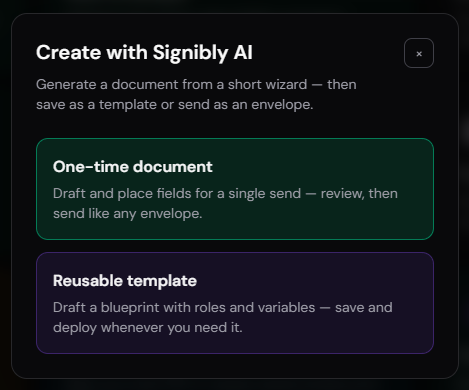
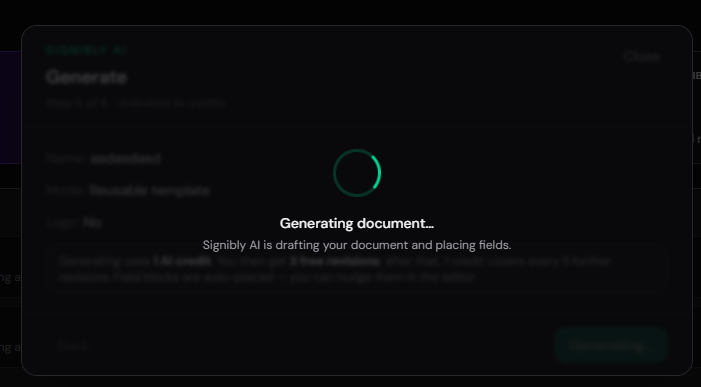
Signibly AI approaches this with a short wizard — document type, one-time envelope or reusable template, party roles, jurisdiction, length, tone, and optional clauses — then produces page images with fields already placed near the relevant blanks. You can request a revision (the first is included, further batches use AI credits), drop your logo, and test the document as each signing party before it ever goes to a real candidate or employee. That review step matters: an AI draft is a strong first pass, not a finished legal instrument, and the workflow is built around checking it rather than trusting it blindly.
What AI generation does not do is exercise legal judgement about your specific business risk. It will draft a standard restraint-of-trade clause if you ask for one, but it cannot tell you whether that clause is enforceable in your state, or whether your specific competitive concerns justify the scope you requested. That judgement call is still yours — or your lawyer's — to make, which is exactly why the sections below on jurisdiction differences and legal advice matter as much as the drafting speed does.
The revision workflow is where AI drafting earns its keep in practice. Say the first draft nails the standard clauses but uses a notice period that does not match what you actually offered during the interview — instead of manually hunting through the document for every place notice is mentioned, you request a revision describing the change, and the system regenerates the affected clauses consistently. Compare that with editing a downloaded template, where changing a notice period means manually checking three or four different sections that might reference it, and hoping none of them were missed.
Jurisdiction differences that break generic templates
Employment law is not close to uniform across countries, or even across states and provinces within one country, and this is the single biggest reason generic templates fail small businesses. In Australia, most employees are covered by the National Employment Standards plus an applicable modern award or enterprise agreement, which sets baseline entitlements around leave, notice, redundancy pay, and often minimum pay rates for the specific industry and classification — a US-style at-will template imported wholesale will miss all of this and can leave a business non-compliant without anyone realising until Fair Work gets involved.
In the United States, the default is at-will employment in most states, but state law varies significantly on non-compete enforceability, final pay timing after termination, and required notices — a contract drafted for California, where non-competes are largely unenforceable, does not transfer cleanly to a state where they are common and enforceable, and vice versa. Businesses hiring across multiple US states on one template are especially exposed here, because "one contract for everyone" quietly assumes a legal environment that does not actually exist nationwide.
The United Kingdom sits somewhere between the two: statutory minimum notice periods scale with length of service, working time regulations cap default hours unless opted out in writing, and written statements of employment particulars are a legal requirement within the first two months regardless of what a company chooses to call its documentation. A template that skips the required particulars, or bundles them incorrectly into a casual offer letter, can leave a UK employer technically non-compliant even if the employee never disputes anything.
Generic templates sourced from a random download rarely disclose which jurisdiction they were written for, and even when they do, "written for Australia" can mean written for one state or one award and silently wrong for another. A jurisdiction-aware AI generator narrows this gap by asking directly which jurisdiction applies and adjusting structure and standard clauses accordingly — but it is still working from general blueprints, not a live read of your specific state, award, or recent case law, which is precisely why local legal review remains necessary for anything beyond a standard, low-risk hire.
The safest mental model is this: treat jurisdiction as a filter that either template or AI must pass before anything else matters. A beautifully formatted contract that references the wrong statutory notice regime is worse than a plain one that gets the jurisdiction right, because the polish makes the underlying error easy to miss until a departing employee — or their lawyer — finds it first.
Canada and New Zealand add further variation worth flagging for any business hiring across borders: Canadian employment standards differ meaningfully by province, with minimum notice and severance obligations that can be considerably more generous than US defaults, while New Zealand requires written employment agreements as a legal baseline rather than an optional best practice. A business expanding from one of these markets into another cannot safely reuse a single home-country template and assume it transfers — the jurisdiction selector in a drafting tool is only useful if the underlying blueprint genuinely reflects that country's baseline requirements, which is worth confirming rather than assuming for any market you have not hired in before.
| Consideration | Generic downloaded template | Jurisdiction-aware AI generator |
|---|---|---|
| Matches your jurisdiction | Unclear or wrong by default | Selected up front in the wizard |
| Matches role type (casual, fixed-term, salaried) | One-size-fits-all clauses | Adjusts structure to employment basis |
| Consistent names/dates across clauses | Manual find-and-replace, error-prone | Populated consistently from wizard answers |
| Ready for e-signature fields | Separate re-upload into a signing tool | Fields auto-placed in the same workspace |
| Version control across hires | Multiple edited copies in email | Reusable template saved in one workspace |
| Legal review still required | Yes, and often overlooked | Yes — AI is a starting point, not a lawyer |
How AI speeds up document creation end to end
The time savings from AI contract generation are not limited to the first draft. Once a business has generated and reviewed one solid employment contract for a given role type and jurisdiction, that document can be saved as a reusable template — meaning the next hire in the same role skips the wizard entirely and starts from an already-approved base, with only the individual's name, pay, and start date changing.
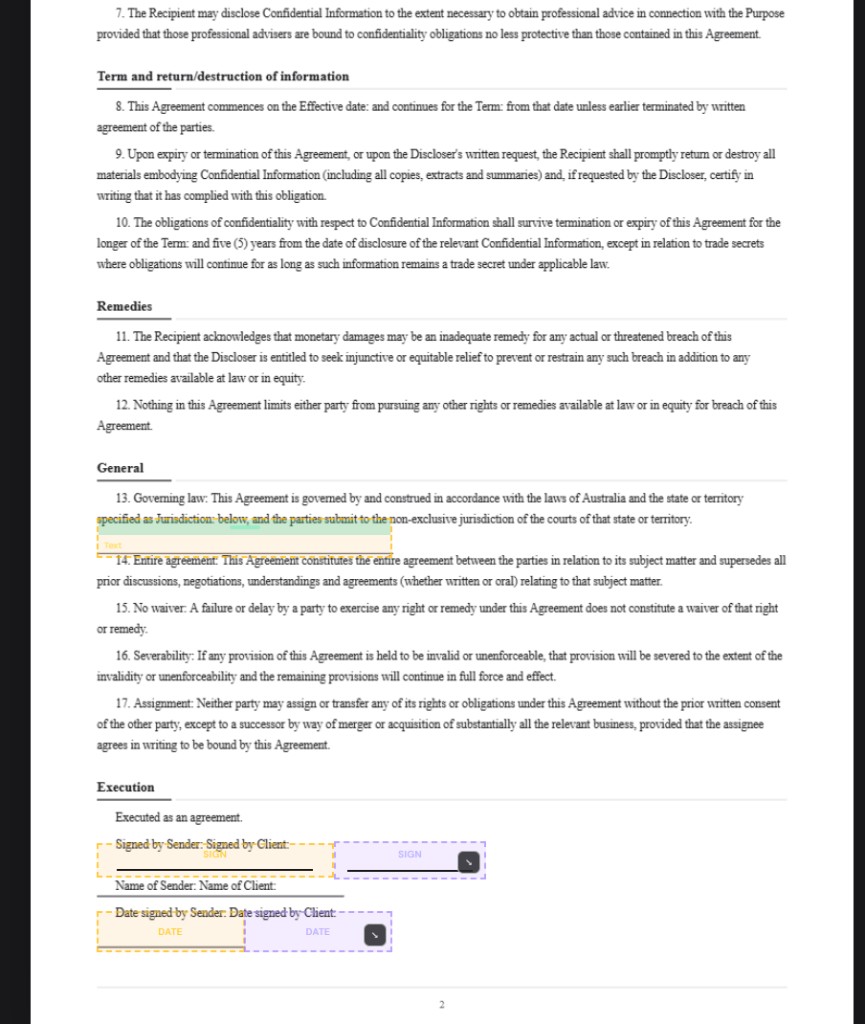
Field placement is the step most templates completely skip. A downloaded Word document has no concept of "this is where the employee signs" until someone manually adds that in a separate e-signature tool. Signibly AI places signature and date fields directly on the drafted pages as part of generation, with party colours already assigned, so there is no gap between "the contract is written" and "the contract is ready to send."
Testing before send closes a gap that causes real embarrassment. Before an employment contract goes to an actual candidate, you can preview and test the document as each signing party — checking that fields land in sensible places, that conditional or optional clauses read correctly, and that nothing looks obviously auto-generated. Catching a formatting issue in a test pass costs nothing; catching the same issue after a new hire has already flagged it looks unprofessional at exactly the moment you are trying to make a good first impression.
Sending and tracking then happen in the same workspace rather than a fourth tool. Signing order, reminders, and completion status live alongside the document itself, so there is no separate signature platform subscription just to finish the job the AI generator started. For a business that hires a handful of people a year, this compresses what used to be a multi-tool, multi-day process — find template, edit, reformat, upload elsewhere, add fields, send, chase signatures — into a single afternoon workflow inside one product.
Team reuse compounds these savings further. Once a hiring manager or HR lead has approved a template for a given role, other people on the account can start from that same approved base rather than reinventing it — reducing the chance that a well-meaning but legally uninformed manager improvises their own version of "the contract" for a role the business already has a correct document for. Centralising the approved template in one shared workspace is a small governance win that most businesses only think about after discovering three different versions in circulation.
Common mistakes employers make with employment contracts
The most frequent mistake is skipping a written contract entirely for casual or short-term hires, on the assumption that an informal arrangement is lower risk because it is less "official." The opposite is usually true — without a written document, both pay expectations and termination terms default to whatever a tribunal decides is reasonable, which is rarely the outcome either side would have chosen if they had written it down up front.
Vague duty descriptions cause a surprising share of workplace disputes. A contract that lists a job title but not the actual scope of duties gives an employer little ground to performance-manage someone for not doing tasks the contract never actually described, and gives the employee little protection against duties creeping well beyond what they agreed to when they signed. Specificity here is cheap at drafting time and expensive to retrofit after a dispute has already started.
Probation clauses are routinely left ambiguous — no clear length, no clear process for extending it, and no clear statement of what notice applies during probation versus after it converts to ongoing employment. When employers try to terminate during what they assumed was still probation, only to discover the clause never actually specified an end date, the mismatch usually favours the employee by default.
Confidentiality and intellectual property assignment clauses are often copied from a template written for a different kind of business — a clause protecting "trade secrets" in manufacturing does very little for a business whose real asset is client lists, source code, or creative work product. Generic IP language can leave genuinely valuable business assets unprotected simply because nobody adjusted the clause to describe what the business actually needs protected.
A related and easy-to-miss mistake is failing to name a governing law and venue clearly when a business operates across state or national lines — remote-first teams especially. Without a clear statement of which jurisdiction's law governs the contract and where any dispute would be heard, a disagreement can turn into an argument about which court even has authority before the actual substance of the dispute is addressed, adding cost and delay neither side wanted.
Finally, many employers keep using a contract template long after the law underneath it has changed — minimum wage increases, updated leave entitlements, or a new award variation — because nobody owns the job of periodically re-checking the base document. A contract that was correct three years ago is not guaranteed to be correct today, and "we have always used this one" is not a defence a regulator or tribunal will accept.
Misclassifying a worker as a contractor when the actual working relationship looks like employment is another expensive and common mistake — control over hours, exclusivity, and provision of tools are among the factors regulators look at, regardless of what the paperwork is titled. A contract labelled "independent contractor agreement" does not settle the question if the day-to-day relationship functions like employment; getting this wrong can trigger back-payment of entitlements, superannuation or payroll tax, and penalties well after the fact.
A closely related mistake is failing to update contracts when a role or working arrangement genuinely changes — an employee who shifts from full-time to part-time, or from office-based to fully remote, on a handshake rather than a signed variation. Without a documented variation, the original contract terms technically remain in force, which creates exactly the kind of gap between what everyone assumes and what is actually enforceable that causes disputes months or years later.
When to get legal advice, no matter which tool you use
Standard hires at standard pay for standard roles are where AI generation and careful template use both perform reasonably well, provided the jurisdiction and role type are correctly matched. The moment a hire moves outside that standard picture, the cost of a drafting mistake rises fast enough that a short paid legal review is cheap insurance rather than an unnecessary expense.
Senior or executive hires usually involve equity, bonus structures, longer notice periods, and restraint-of-trade clauses with real financial stakes if they are unenforceable or drafted too broadly — this is exactly the territory where a generic clause, AI-drafted or not, needs a lawyer's judgement about what is actually enforceable in your jurisdiction and appropriate for the role.
Redundancy, restructuring, and any termination that is likely to be contested deserve legal review before the paperwork goes out, not after the employee has already raised concerns. The financial and reputational cost of getting a redundancy process wrong is almost always larger than the cost of a lawyer checking the process and the letter beforehand.
Cross-border or remote hires in a jurisdiction your business has not hired in before are a near-automatic case for legal advice — tax withholding, local statutory minimums, and even whether the arrangement should legally be an employment contract versus a contractor agreement can differ enough from your home jurisdiction that an AI blueprint built for one country will not safely cover another without local input.
The practical rule Signibly recommends: use AI generation to get a fast, well-structured starting point and to remove the blank-page and formatting problem entirely, then route anything non-standard — executives, restraint clauses with real teeth, disputed terminations, or first hires in a new jurisdiction — past a qualified employment lawyer before it is signed. AI drafting is not legal advice, and no responsible contract generator should claim otherwise; the value is in the speed of the first ninety percent, not in replacing judgement on the last ten.
Budgeting for legal review is worth planning rather than treating as an emergency expense. Many employment lawyers will review a drafted contract for a fixed, modest fee — far less than drafting one from scratch — precisely because reviewing an already-structured document is faster than starting from nothing. Building a one-off legal review into the cost of any non-standard hire, the same way you would budget for a background check or a reference call, turns "should we get this checked" from a judgement call made under deadline pressure into a normal, planned step in the hiring process.
Is an AI-generated employment contract legally binding?
Yes, once it is properly executed by both parties — an AI-drafted contract is just a document, and its enforceability depends on the same things any contract depends on: valid content, correct jurisdiction, and proper signing. The AI does not change how binding it is; it changes how quickly you get to a solid draft.
Can an AI employment contract generator replace a lawyer?
No. It replaces the blank page and the outdated template, producing a structured, jurisdiction-aware first draft in minutes. Standard, low-risk hires are often fine after a careful self-review, but executive contracts, restraint clauses, redundancies, and cross-border hires should still go past a qualified employment lawyer before signing.
Why not just use a free downloaded template instead?
Free templates are often outdated, written for the wrong jurisdiction, or edited inconsistently over time by whoever last touched the file. They also require a separate step to reformat and add signature fields before you can send them. An AI generator keeps drafting, fields, and sending in one workspace and reduces the chance of stale clauses slipping through.
How does Signibly AI generate an employment contract?
You complete a short wizard — role type, employment basis, jurisdiction, probation and notice, and any specific clauses — and Signibly AI drafts pages with signature fields already placed. You can request revisions, add your logo, and test the document as each party before sending it for signature.
Does the AI account for different state or country laws?
Signibly AI drafts from jurisdiction-aware blueprints for common structures, so a contract generated for Australia, the UK, or the US follows a recognisable local structure rather than a generic default. It does not replace a live check of current local law, which is why non-standard hires should still get a legal review.
What happens after the employment contract is signed?
Because contract drafting and e-signature sit in the same Signibly workspace, a completed employment contract stays with your other signed documents, and the same account can handle onboarding paperwork, invoicing for contractor arrangements, and document storage without a second subscription for a separate signing tool.
Related
Signibly AI guide · E-Signatures · Templates · For small business · Signibly vs DocuSign · Pricing · Shelf-ware waste · Standalone tax · Hide unused features · Top 10 SMB software · FreshBooks vs Signibly · Track partial payments · DocuSign vs PandaDoc · AI document creation · PandaDoc vs SignNow · PandaDoc pricing 2026 · PandaDoc vs Adobe Sign · SignWell vs DocuSign · Signaturely vs DocuSign · Dropbox Sign & invoicing · eSignLive vs DocuSign · AI fillable PDF guide · Complete document workflow · PandaDoc vs DocuSign vs Signibly · Hidden cost of five business apps · Best AI contract generators · 50 business documents checklist · AI vs lawyers for contracts · Client onboarding guide · Build a paperless business · Switch to Signibly AI · Scan receipts & invoices · Replace multiple apps · All-in-one SMB software · Custom dashboards · All blog posts · All solutions · Compare vendors