PandaDoc vs DocuSign vs Signibly (2026)
A practical three-way 2026 comparison of PandaDoc, DocuSign, and Signibly — pricing, features, and which fits freelancers, agencies, consultants, construction, accountants, and growing teams.
Why people compare PandaDoc, DocuSign, and Signibly in 2026
Search for e-signature software long enough and three names keep surfacing: DocuSign, the category-defining incumbent; PandaDoc, the proposal-and-sign platform sales teams favour; and Signibly, a newer all-in-one workspace built for small businesses that also need invoicing, payments, and expense tracking without adding software.
Each solves signing, but from different starting points. DocuSign optimises for enterprise trust and compliance breadth. PandaDoc optimises for the sales proposal that becomes a contract. Signibly optimises for the small business that wants signing plus what happens after the signature — for one honest monthly price.
This guide is for owners, freelancers, and small teams deciding between three genuinely different products, not three interchangeable e-signature clones. Prices and features change — verify current plan details on each vendor's site before purchasing, especially for DocuSign and PandaDoc, whose tiers shift often.
The one-sentence summary of each
DocuSign: the safe, recognisable choice for enterprises and regulated industries that need broad compliance certifications and are prepared to pay enterprise-style pricing for them.
PandaDoc: the best choice for sales-led teams whose contracts are the output of a configurable, trackable proposal with pricing tables and analytics.
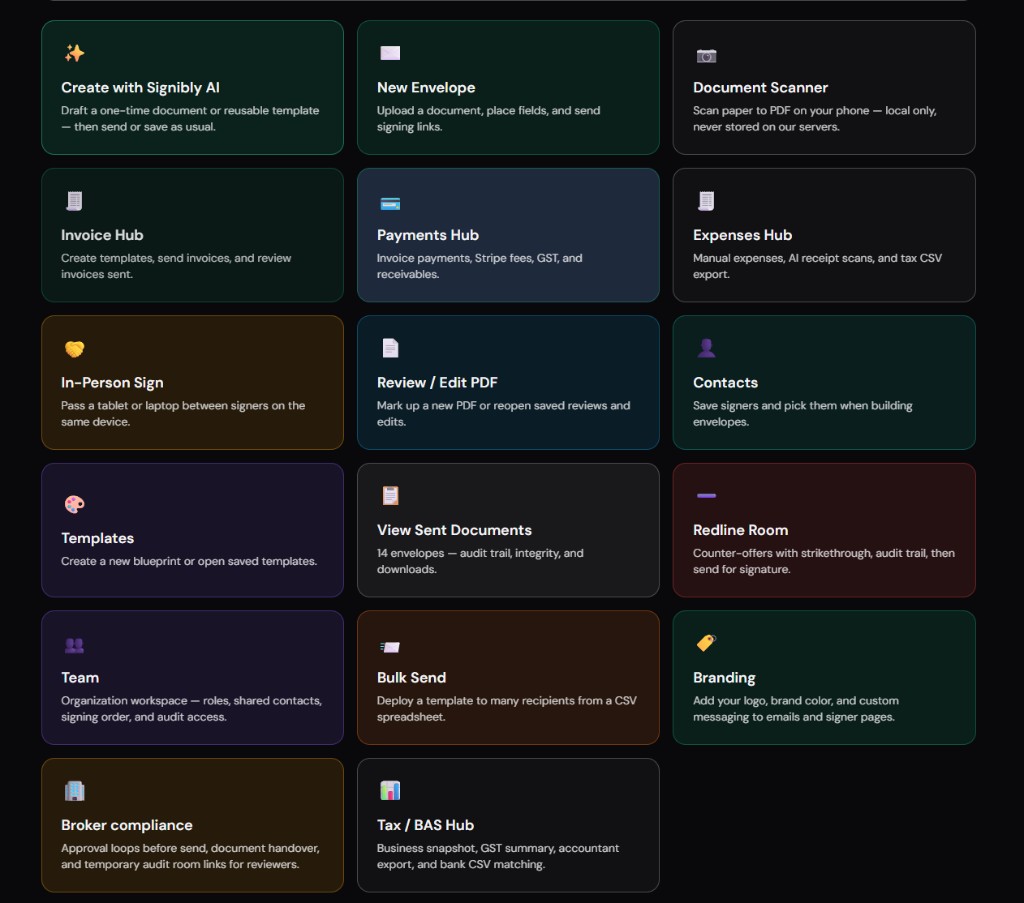
Signibly: the best choice for small businesses and freelancers who want e-signatures, AI contract drafting, invoicing, payments, and expense tracking in one workspace from $10/month AUD — without paying enterprise prices for modules they will never use.
What DocuSign is built for
DocuSign built its reputation on being the e-signature vendor large organisations trust by default — broad certifications, deep audit trails, and integrations across Salesforce, Microsoft, and dozens of enterprise systems. For regulated industries and large legal teams, that track record carries real weight in procurement conversations.
The trade-off is complexity and price scaled for enterprise buyers. Small business plans exist, but core advanced features — bulk send, advanced authentication, deeper API access — often sit on higher tiers priced per user per month, which adds up quickly for a five-person team.
DocuSign does not attempt to be a proposal builder, an invoicing platform, or an expense tracker. It is, deliberately, a signing and agreement-management platform — very good at that one job, and priced accordingly for teams that need only that job done at enterprise scale.
What PandaDoc is built for
PandaDoc treats the signature as the final step of a sales document, not a standalone action. Reps build proposals with configurable pricing tables, product catalogues, and content blocks; clients review, sometimes negotiate line items, and sign inside the same experience — with engagement analytics showing which sections they actually read.
That makes PandaDoc a strong fit for B2B sales teams closing deals with optional add-ons or tiered packages, where the document itself does some of the selling. It is less suited to teams that only need to get an already-finalised PDF signed quickly.
PandaDoc, like DocuSign, stops at the signature. Invoicing, payment tracking, and expense management require separate software — PandaDoc includes basic payment collection on some plans, but not a full accounts-receivable or expense workflow.
What Signibly is built for
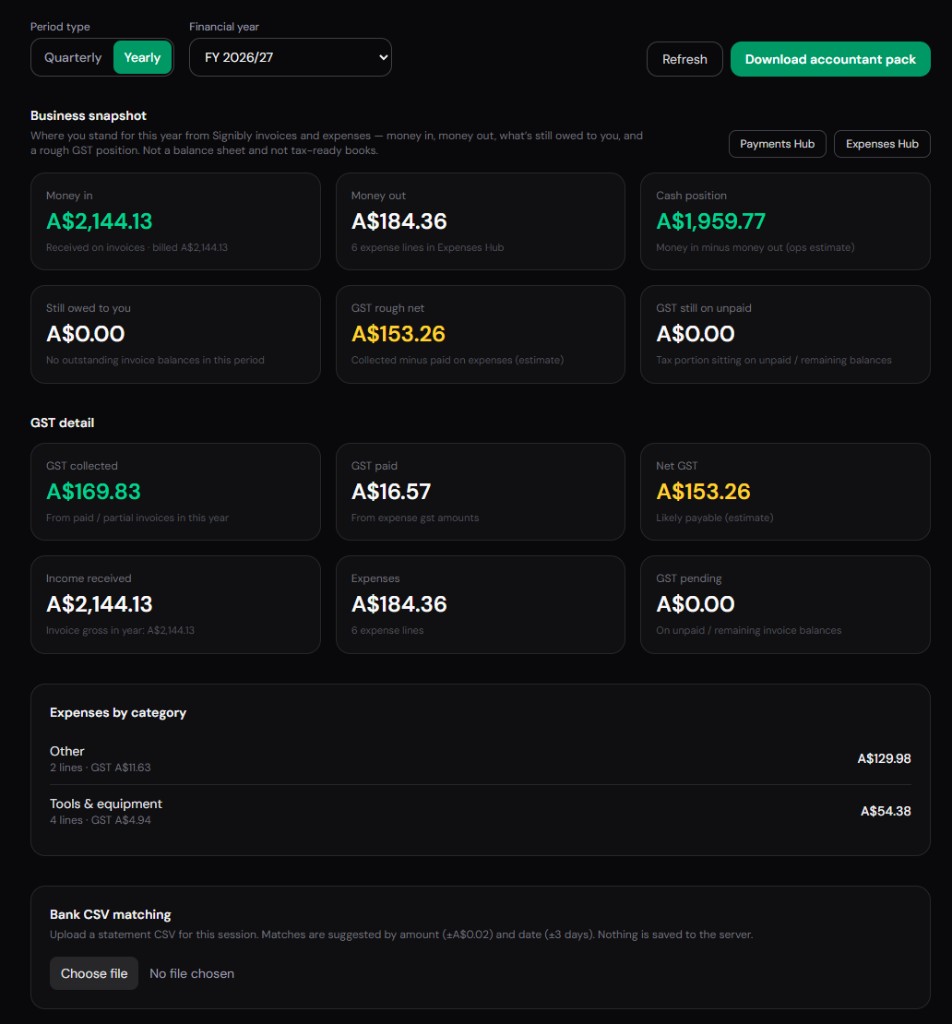
Signibly starts from a different question: what does a small business actually need to run client work end to end, not just to collect a signature? The answer bundles AI contract drafting, auto field placement on uploaded PDFs, e-signatures, invoicing, payment collection, expense tracking with AI receipt and invoice scans, and tax / BAS summaries into one workspace.
Signibly AI drafts from a structured wizard — roles, jurisdiction, length, clauses — and can also auto-place fields on a PDF someone else sent you, scanning up to 20 pages in high-detail batches. That closes a gap neither DocuSign nor PandaDoc's base signing tools fill natively for uploaded documents.
The trade-off is scale: Signibly is built for freelancers, small teams, and growing businesses, not for enterprise procurement processes demanding dozens of niche compliance certifications. For that audience, DocuSign remains the safer default; for everyone running client work without a dedicated operations team, Signibly's bundled price is hard to beat.
Pricing in 2026 (directional)
DocuSign personal and standard plans often start in the mid-teens to mid-forties USD per month per user, with advanced features — bulk send, custom branding, deeper integrations — reserved for business and enterprise tiers that can run considerably higher.
PandaDoc typically starts in the mid-thirties USD per user per month for plans with meaningful document quotas and CRM integrations, climbing further for enterprise workflows.
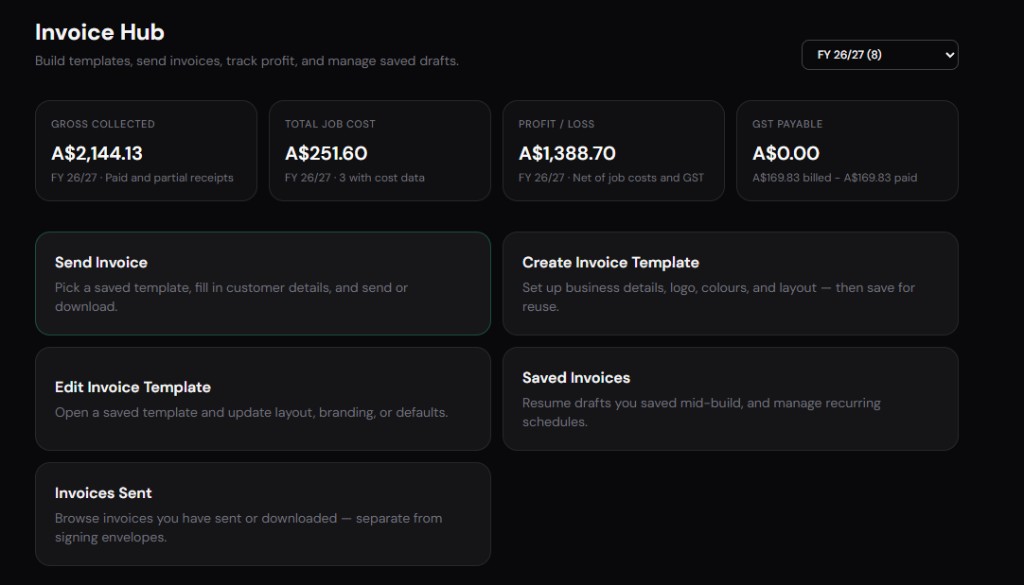
Signibly publishes one Business price: $10/month AUD (roughly $6.50 USD, shown in your local currency at checkout) for unlimited envelopes and invoices under fair use, a monthly AI credit pool, and every hub — Invoice, Payments, Expenses, Tax / BAS. Extra team seats are also $10/month AUD each. Free is $0/month with capped envelopes for trying core signing.
All figures are directional — DocuSign and PandaDoc both change tiers and bundle features differently by region; confirm current pricing on each vendor's site before purchasing.
PandaDoc vs DocuSign vs Signibly: feature comparison
The table focuses on capabilities most small teams actually use week to week — not the full enterprise feature list. Confirm plan-specific details before purchasing.
| Feature | DocuSign | PandaDoc | Signibly |
|---|---|---|---|
| Primary strength | Enterprise trust & broad compliance | Sales proposals with pricing tables | Sign + invoice + pay + expenses in one |
| Typical starting price | ~$15–45+ USD/mo per user | ~$35+ USD/mo per user | From $10/mo AUD (~$6.50 USD) flat |
| AI contract drafting | Limited / add-on | Content library, not full AI drafting | Structured wizard + jurisdiction blueprints |
| Auto field placement on PDFs | Manual field placement | Manual field placement | AI scan, 1 credit / 6 pages |
| Test signers before send | Limited preview | Limited preview | Preview as any party freely |
| Proposal / pricing tables | Not native | Core feature | Quote-to-invoice line items |
| Invoicing after signature | Not included | Basic payment blocks only | Full Invoice Hub included |
| Payment tracking (partial / offline) | Not included | Limited | Payments Hub dashboard |
| Expense & receipt tracking | Not included | Not included | Expenses Hub + AI receipt and invoice scans |
| Tax / BAS summaries | Not included | Not included | Tax / BAS Hub |
| Best default audience | Enterprise & regulated industries | B2B sales teams | Freelancers, agencies & growing SMBs |
Onboarding and setup time
DocuSign setup for a small team is usually fast for basic sending — upload a PDF, place fields, send — but advanced features like bulk send, custom branding, and API access typically require additional configuration time and, on higher tiers, involvement from DocuSign's own onboarding or support resources.
PandaDoc front-loads more setup work than either alternative: its value depends on a built-out content library, product catalogue, and pricing-table structure. Skip that investment and reps often bypass the editor entirely, reverting to email attachments and quietly wasting the subscription.
Signibly is designed to be usable within the first session: draft a contract with the AI wizard, or upload a PDF and auto-place fields, without needing a content library or catalogue built in advance. Invoice templates and expense categories can be set up gradually as you actually need them, rather than as a prerequisite to sending your first envelope.
For a small team evaluating all three, time a real onboarding task — draft one contract, send it, and get it signed — on each platform. The tool that gets a genuine first document out the door fastest, without a week of setup, tells you more than any feature comparison page.
Integrations and ecosystem fit
DocuSign integrates deeply with Salesforce, Microsoft 365, and a long list of enterprise systems — a real advantage if your business already standardises on those platforms and needs signing to slot into existing approval workflows without custom development.
PandaDoc integrates closely with CRMs like HubSpot, Salesforce, and Pipedrive, reflecting its sales-document heritage — proposals often pull product and pricing data directly from the CRM record, reducing manual entry for reps working a pipeline.
Signibly takes a different integration approach: rather than connecting to a wide external ecosystem, it consolidates the downstream steps — invoicing, payments, expenses, tax summaries — inside the same product, so there is less need for an integration in the first place. Google Drive archive integration covers the most common external need: getting completed documents into the file storage system you already use.
Neither approach is objectively better — teams already deep in Salesforce or HubSpot workflows may value DocuSign or PandaDoc's integrations more than a bundled alternative; teams without a complex existing stack often prefer having fewer integrations to manage in the first place.
Mobile and signer experience
All three platforms deliver competent mobile signing — clients increasingly expect to sign from a phone between meetings, and none of the three treats this as an afterthought. DocuSign's signer experience is the most widely recognised by name, which can reduce hesitation from signers who have used it before elsewhere.
PandaDoc's mobile experience includes proposal browsing before signature, useful when clients want to review optional modules or pricing tiers on a small screen before committing. Signibly's mobile signer flow focuses on the signature itself plus, when relevant, mobile payment collection at the same moment.
Test your actual document, not a one-page demo NDA, on each platform's mobile flow before choosing. Heavier PDFs with embedded fonts or multiple exhibits load and render differently across vendors, and a slow mobile load is a real cause of signer drop-off regardless of which company's name is on the login screen.
Security, compliance, and audit trails compared
DocuSign carries the deepest bench of compliance certifications and enterprise security attestations among the three, reflecting decades of enterprise and regulated-industry deployment. For businesses in healthcare, finance, or government-adjacent work where a specific certification is a hard procurement requirement, that track record often settles the decision on its own.
PandaDoc maintains standard security practices expected of a modern SaaS sales platform, with audit trails sufficient for typical commercial B2B use, though it does not carry the same breadth of specialised certifications as DocuSign's upper tiers.
Signibly provides full audit trails on completed envelopes — who signed, when, and from what IP — along with completion certificates, which covers the practical evidentiary needs of the vast majority of small business agreements. It is not positioned as a specialised-compliance enterprise platform, and businesses with a specific mandated certification requirement should confirm it against DocuSign's published attestations rather than assume equivalence.
For the large majority of small businesses that need "a signature that would hold up if questioned," rather than a specific named certification demanded by a large enterprise customer or regulator, all three provide sufficient audit trail depth — the differentiator becomes what happens before and after the signature, not the signature event itself.
Total cost of ownership at different team sizes
At one person, the gap is largest in relative terms: DocuSign and PandaDoc per-user pricing applies in full to a single seat, while Signibly's flat $10/month AUD Business plan already includes invoicing, payments, and expense tracking that a solo DocuSign or PandaDoc user would otherwise need to buy separately from a second vendor.
At five people, DocuSign or PandaDoc licensing alone can approach or exceed $150–200+ USD per month before adding any invoicing or expense software — Signibly's five-seat cost stays proportional at $10/month AUD per seat, roughly $50/month AUD total, still inclusive of every hub.
At fifteen or twenty people, enterprise-tier DocuSign or PandaDoc contracts often introduce negotiated custom pricing, which can bring effective per-seat cost down from list price — at that scale, a genuine side-by-side quote from each vendor, including any bundled invoicing or CRM tools already in place, is worth requesting rather than relying on list-price comparisons alone.
The consistent theme across every team size: DocuSign and PandaDoc price the signature; Signibly prices the whole downstream workflow. Whether that bundling is worth it depends entirely on whether you would otherwise pay for separate invoicing and expense software anyway — for most small businesses running client work, the answer is yes.
Template libraries and reusability
DocuSign supports reusable templates on most paid tiers, useful for standardising HR paperwork, vendor agreements, and other repeated document types across a growing organisation — though building a genuinely useful template library takes deliberate setup time.
PandaDoc's content library is arguably its strongest feature for sales teams: reusable blocks for pricing, terms, and case studies can be assembled into new proposals quickly once the library exists, which is exactly why the upfront setup investment matters so much for PandaDoc specifically.
Signibly lets you save any AI-drafted or uploaded-and-field-mapped document as a template, including its field placements and party structure, so a service agreement or NDA drafted once becomes a one-click starting point for every future client of that type without rebuilding from scratch or re-running the wizard.
Across all three, the underlying lesson is the same: templates only pay off once you actually build them. A platform with excellent template features and an unused library provides no more value than one without the feature at all — budget real time in the first weeks on any platform to build the two or three templates you will reuse most often.
Customer support and switching costs
DocuSign's support depth generally scales with plan tier — enterprise customers get dedicated account management, while lower tiers rely more on self-service documentation and standard support queues, which can feel slow when a signing deadline is looming.
PandaDoc offers support proportional to its own tiers, with account management typically reserved for higher-volume customers — smaller teams should expect a similar self-service-first experience for routine questions.
Signibly, as a smaller and newer platform, competes on responsiveness for its size rather than an enterprise support organisation's scale — a genuine trade-off for businesses that specifically value having a large vendor's support infrastructure behind them versus a platform built to be simple enough that support tickets are needed less often in the first place.
Switching costs matter more than initial price for any of the three: migrating templates, retraining staff, and re-establishing client-facing familiarity with a new signing experience all take real time. Factor a realistic migration period into any decision, and avoid switching platforms more often than the actual pain of staying justifies.
How trials and free plans compare
DocuSign typically offers a short free trial period on its paid plans, after which pricing reverts to standard per-user rates — enough to test the core signing flow but generally not enough time to run a full real client engagement through the platform end to end.
PandaDoc similarly offers a limited free trial focused on proposal and document creation, with the same practical limitation: a short trial window rarely covers a full sales cycle from proposal to signed and paid contract for a typical B2B deal length.
Signibly's Free plan has no expiry — it stays at $0/month indefinitely with capped envelopes and one manual invoice, letting you test core signing for as long as you want before deciding whether to upgrade. Business adds a short trial period on monthly billing specifically so you can run one real client engagement through invoicing and payments before the first charge applies.
When evaluating any of the three, resist judging a platform from a five-minute demo login. Draft one real document, send it to a real signer, and — where relevant — issue one real invoice before comparing platforms on anything more than surface impressions.
Best for freelancers
Freelancers rarely need enterprise compliance certifications or a sales proposal engine with product catalogues — they need to send a clean contract, get it signed, invoice for the work, and get paid without juggling three subscriptions on a single-person budget.
DocuSign's per-user enterprise pricing is overkill for one person sending a handful of contracts a month. PandaDoc's proposal tooling is more machinery than a freelancer typically needs for a straightforward service agreement.
Signibly's bundled pricing — one $10/month AUD plan covering signing, AI drafting, invoicing, and payments — fits a freelancer's actual weekly workflow and budget better than paying for a compliance-heavy or sales-heavy platform built for a different buyer.
Best for agencies
Agencies juggle multiple concurrent client contracts, recurring retainer invoices, and project expenses — proposals matter, but so does what happens after the client says yes.
PandaDoc's proposal and pricing-table strengths suit agencies pitching packaged services with optional add-ons. But once the deal closes, agencies still need somewhere for recurring invoices and expense tracking against each client's budget — which means adding a second tool alongside PandaDoc.
Signibly lets an agency draft the scope of work, collect signatures, invoice the retainer, and track project expenses under one client record — useful when account managers are juggling a dozen clients and cannot afford five logins per client.
Best for consultants
Consultants sign NDAs and engagement letters frequently, often needing jurisdiction-aware wording and clean, professional-looking documents without a design team.
DocuSign handles the signature step reliably but leaves drafting to a word processor and a template library you maintain yourself. Signibly AI's wizard generates a first draft of an engagement letter or NDA from a short set of answers, which consultants can then refine — a genuine time saving for solo or small consulting practices sending several agreements a month.
Combined with invoicing for milestone-based consulting fees, Signibly covers the full arc from a scope discussion to a paid invoice without a separate billing platform.
Best for construction and trades
Trades and construction businesses deal with quotes that change as materials prices shift, milestone payment contracts, and job-site expense receipts that need to be logged before they get lost.
Neither DocuSign nor PandaDoc offers job-costed expense tracking or receipt and invoice scanning — that need typically gets solved with a third app layered on top of whichever signing tool a trade business already pays for.
Signibly's Expenses Hub, paired with AI receipt and invoice scans from a phone photo, plus milestone invoicing tied to the signed contract, matches how trades businesses actually operate — quote, sign, invoice deposit, buy materials, log receipts, invoice the balance.
API access and developer extensibility
DocuSign's API is mature and widely used for embedding signing flows directly inside other software products — a real advantage for larger businesses or software vendors who need signing embedded inside their own customer-facing application rather than sending clients to a separate DocuSign-branded page.
PandaDoc offers API access on higher tiers as well, generally aimed at CRM-adjacent integrations rather than deep embedded signing experiences, reflecting its sales-tooling focus.
Signibly is built primarily as a complete workspace rather than an embeddable API-first platform — a deliberate trade-off for the small business audience it targets, most of whom want to use the product directly rather than build custom integrations against it. Businesses specifically needing to embed signing inside their own software product should weigh DocuSign's API maturity accordingly.
Annual vs monthly billing considerations
DocuSign and PandaDoc both typically offer meaningful discounts for annual commitments over monthly billing — often 15 to 25 percent lower effective monthly cost — which rewards businesses confident in their long-term usage but penalises those still evaluating fit.
Signibly's published pricing centres on a straightforward monthly Business rate, with a short free trial period on monthly billing before the card is charged — a lower-commitment way to validate the product against a real client engagement before deciding on a longer relationship.
For any of the three, resist the temptation to commit annually before running at least one full real client engagement through the platform end to end. The discount for annual billing is only a saving if the tool actually fits your workflow — locking in a year of a platform that turns out to be the wrong shape for your business erases any pricing advantage immediately.
Best for accountants and bookkeepers
Accountants and bookkeepers care less about flashy proposal tooling and more about clean records: engagement letters signed correctly, invoices that reconcile, and expense data that exports cleanly at period end.
DocuSign's audit trails are strong and well recognised by accounting bodies familiar with enterprise tools. PandaDoc's proposal features are largely irrelevant to a bookkeeping practice's own client engagement process.
Signibly's Tax / BAS Hub period summaries and accountant-ready export packs are built with this audience in mind — not to replace the accountant's own software, but to hand them clean numbers instead of five apps to chase.
Best for growing businesses
A business hiring its third or fourth employee starts needing team permissions, shared templates, and a consistent client record across staff — while still watching costs closely enough that per-seat enterprise pricing stings.
DocuSign and PandaDoc both scale reasonably well for growing teams, at growing per-seat cost. Signibly's team seats are also priced per user at $10/month AUD each — the same flat rate as the base plan, not a jump to a higher-priced tier once you add headcount.
Growing businesses considering all three should model total cost at their expected headcount in twelve months, not just today's team size — per-seat pricing gaps widen fast as a five-person team becomes fifteen.
Migrating from DocuSign or PandaDoc without losing history
A common hesitation when considering a switch away from an established DocuSign or PandaDoc account is losing access to years of completed, signed document history — a legitimate concern, since those completed envelopes are often the only proof a past agreement was ever executed.
Before migrating, export and archive every completed envelope from the outgoing platform, including its audit trail and completion certificate where available. Most platforms, including DocuSign and PandaDoc, allow bulk export of completed documents specifically for this purpose — do this before cancelling any subscription, not after.
New agreements going forward can start fresh on the new platform without needing historical documents to be re-imported or recreated — there is no requirement that past and future signed documents live in the same tool, only that both remain accessible if ever needed for a dispute, an audit, or a client request.
A phased migration — running the new platform for all new engagements while the old platform remains accessible in a read-only capacity for a few months to retrieve historical records if needed — reduces risk compared with an abrupt full cutover on a single day.
Three real-world workflow scenarios
Scenario A — a five-person marketing agency: proposals with pricing tables for optional add-on services close best in PandaDoc, but the agency still needs somewhere to invoice monthly retainers and track project expenses against each client's budget. Left with PandaDoc alone, they add a second subscription for that; with Signibly, drafting, signing, invoicing, and expense tracking sit in the same client record from day one.
Scenario B — a mid-sized firm signing vendor MSAs for procurement: the counterparty specifically requires DocuSign due to an internal compliance policy. There is no substitute here — when a customer or regulator names a specific platform as a requirement, that requirement overrides any cost or workflow argument, and DocuSign is the correct choice regardless of what else it lacks.
Scenario C — a solo tradesperson quoting, signing, and invoicing residential jobs: neither DocuSign nor PandaDoc's core plans include expense tracking or a quote-to-invoice line-item flow, so a tradesperson choosing either would still need a separate invoicing app and a separate way to log materials receipts. Signibly's bundled hubs match this workflow directly without adding a second subscription.
A note on switching costs between all three
Businesses already invested in DocuSign or PandaDoc templates, integrations, and staff familiarity should weigh the real cost of switching against the ongoing cost of staying. A mature DocuSign or PandaDoc deployment with years of templates and trained staff represents genuine sunk value that a cheaper alternative does not automatically outweigh on day one.
The calculation changes once a business recognises it is paying twice — once for signing, again for a separate invoicing and expense tool doing overlapping client-record work. At that point, the switching cost is weighed against an ongoing double subscription cost that compounds every month, not a one-time comparison.
Whichever direction you lean, run a real pilot before deciding. Draft, send, and get paid for one actual client engagement on the platform you are considering switching to, in parallel with your existing tool, before committing to a full migration.
Limitations worth knowing
DocuSign cons: cost scales quickly for small teams needing advanced features; no native invoicing, payments, or expense tracking; enterprise focus can feel like overkill for a five-person business.
PandaDoc cons: proposal tooling is wasted on straightforward signing-only use cases; no expense tracking; payment features are limited compared with a dedicated invoicing platform.
Signibly cons: not built for enterprise procurement checklists demanding dozens of niche compliance certifications; AI drafting still needs human review for complex or high-stakes agreements; a smaller company footprint than DocuSign's decades-long enterprise track record.
Every platform here is a reasonable choice for the right buyer — the mistake is picking based on brand recognition alone rather than matching the tool to your actual weekly workflow and budget.
Which should you choose?
Choose DocuSign if you are in a regulated industry or an enterprise procurement process that specifically requires its certifications, and you have budget for per-user enterprise pricing.
Choose PandaDoc if your sales process lives inside configurable proposals with pricing tables, and signing is the natural last step of that document, not a standalone action.
Choose Signibly if you are a freelancer, agency, consultant, trade business, or growing SMB that wants AI-assisted drafting, e-signatures, invoicing, payments, and expense tracking under one $10/month AUD plan — without paying separately for tools you would otherwise stitch together yourself.
Run a real pilot with one actual contract on each shortlisted platform before committing annually — the tool that removes the most manual steps for your specific workflow beats the one with the most familiar name.
Is Signibly cheaper than DocuSign and PandaDoc?
Generally yes for small teams — Signibly Business is $10/month AUD flat, including invoicing, payments, and expenses, while DocuSign and PandaDoc price per user and typically require separate software for billing and expense tracking.
Can Signibly replace both my e-signature tool and my invoicing software?
Yes — Invoice Hub and Payments Hub are included in the same Business plan as e-signatures, so most small teams do not need a separate invoicing subscription.
Which is best for enterprise compliance requirements?
DocuSign has the longest track record and broadest certifications recognised in enterprise procurement; if your buyer specifically requires those certifications, start there.
Does PandaDoc include invoicing?
PandaDoc includes limited payment collection on some plans but is not a full invoicing or expense-tracking platform — most PandaDoc users still run separate accounting software.
Related
Signibly vs DocuSign · Signibly vs PandaDoc · PandaDoc vs SignNow · PandaDoc vs Adobe Sign · Signibly AI guide · Pricing · Shelf-ware waste · Standalone tax · Hide unused features · Top 10 SMB software · FreshBooks vs Signibly · Track partial payments · DocuSign vs PandaDoc · AI document creation · PandaDoc pricing 2026 · SignWell vs DocuSign · Signaturely vs DocuSign · Dropbox Sign & invoicing · eSignLive vs DocuSign · AI vs template contracts · AI fillable PDF guide · Complete document workflow · Hidden cost of five business apps · Best AI contract generators · 50 business documents checklist · AI vs lawyers for contracts · Client onboarding guide · Build a paperless business · Switch to Signibly AI · Scan receipts & invoices · vs Xero · vs FreshBooks · vs QuickBooks · vs SignNow · vs Zoho Books · Cheaper DocuSign alternative · Replace multiple apps · All-in-one SMB software · Custom dashboards · All blog posts · All solutions · Compare vendors