The Hidden Cost of Running Five Different Business Apps
DocuSign, Xero, Expensify, Dropbox, and separate payment software: what running five different business apps actually costs in dollars, time, and errors — and how one integrated workflow compares.
The subscription total nobody adds up
Ask a small business owner what they pay for DocuSign, and most know the number. Ask what they pay across DocuSign, Xero, Expensify, Dropbox, and a payment processor combined, and most have never added it up — because the bill never arrives as one number. It arrives as five separate charges on five separate days, each looking individually reasonable.
That is not an accident of billing design — it is how subscription software is sold. Every vendor prices against what does this feature alone cost, never against what does your combined stack cost to run the same job. Small businesses end up the ones doing that math, if they do it at all.
This article is not an argument that you must abandon every tool you currently use. It is a plain accounting of what running five separate apps for one connected workflow actually costs — in dollars, in time, and in error risk — so you can decide with real numbers instead of habit.
The five apps most small businesses end up running
A common stack looks like this: DocuSign or a similar tool for contracts and signatures, Xero or QuickBooks for invoicing and bookkeeping, Expensify for receipt capture and expense reports, Dropbox or Google Drive for file storage, and Stripe or PayPal — often through a separate payment page or plugin — for collecting money.
Each was chosen for a good reason: DocuSign because it is the recognisable signing standard, Xero because an accountant recommended it, Expensify because a team member found it easy to snap a receipt with. None of these are bad tools individually.
The problem is what happens between them: the client's name typed once into DocuSign, again into Xero, again mentally cross-referenced in Expensify reports, again searched for in Dropbox when someone needs the signed contract months later.
The real cost is not the sticker price
Add up list prices for a five-person team and the combined monthly bill for those five apps commonly lands somewhere between $150 and $300 or more USD a month, depending on plan tiers and per-seat pricing. That number alone justifies a second look for many small businesses.
But the sticker price is the easy part to calculate and, in our experience talking to small business owners, rarely the part that actually changes behaviour. The harder costs — time, errors, security sprawl — are invisible on an invoice and easy to underestimate until you measure them directly.
The next sections break those hidden costs down individually, with rough time and dollar estimates, so the comparison at the end is grounded in something more concrete than a feeling that it is a lot of apps.
Cost 1: duplicate data entry
A new client typically gets entered manually into at least three of the five systems: DocuSign as a signer, Xero as a customer record, and Expensify if expenses get tagged per client — sometimes a fourth time in a CRM that is not even part of this list.
Each entry takes two to five minutes and each entry is an opportunity for a typo — a misspelled email that bounces a signature request, a business number transposed on an invoice, a client name inconsistent enough between systems that year-end reporting undercounts revenue from one client split across two spellings.
For a business onboarding two new clients a week, that is roughly ten to twenty minutes of pure re-typing weekly — not including the time spent noticing and fixing the inevitable mismatches later.
Cost 2: context switching and lost time
Every login, every search for where a file was saved, and every app-specific interface adds cognitive overhead that does not show up on a time sheet but absolutely shows up in how long a routine task takes. Sending a contract, then switching to invoice the deposit, then switching again to log a related expense easily costs ten to fifteen minutes of pure navigation across five apps for a task that should take three.
Research on task-switching consistently shows that returning to full focus after an interruption takes longer than the interruption itself — a pattern office workers feel every time they move between five different logins to complete one client transaction.
Multiply that by every client transaction in a month, and context switching alone can eat several hours of otherwise billable time — hours that never appear on an expense report because there is no line item called logging into things.
Cost 3: reconciliation errors
When a price lives in five places — the original proposal, the signed contract, the invoice, a spreadsheet tracking a mid-project rate change, and the client's own records — the chance that all five agree perfectly after a single revision is low.
Reconciliation errors surface at the worst possible time: a client questions an invoice total that does not match what the signed contract says, because someone updated the contract but forgot to update the invoice template it was copied from months earlier.
Bookkeepers and accountants spend real billable hours each quarter chasing these mismatches — hours a small business often pays for without realising the root cause is tool fragmentation, not bookkeeper error.
Cost 4: the "who has access" security sprawl
Five apps means five separate places to manage who on your team can see client contracts, financial data, and payment details — five separate password resets when someone leaves the business, five separate two-factor setups, five separate permission models that rarely map onto each other cleanly.
It is common for a departing employee's access to be revoked from the main system — usually accounting software — while a login to the e-signature tool or the receipt and invoice scanning app quietly remains active for weeks, because nobody built a checklist covering all five systems.
This is not a hypothetical compliance risk — client contracts, bank-linked expense data, and payment information sitting in forgotten active logins is exactly the kind of exposure that a data-breach post-mortem later identifies as something that should have been caught.
Cost 5: the audit gap when a client disputes something
Every business eventually faces a client who disputes an invoice, questions a contract term, or asks for everything related to a job. Answering that request across five systems means logging into all five, searching each one's own interface, and hoping the record you need was actually archived somewhere rather than lost in an old email thread.
The businesses that handle this well are not the ones with the most sophisticated individual tools — they are the ones where every document related to a client engagement sits in one connected place, so that request takes minutes instead of an afternoon.
This audit gap is invisible until the day you need it, which is exactly why it is easy to underestimate when comparing subscription costs on price alone.
The apps nobody counts: the sixth and seventh subscription
Five is usually an undercount. Add a project management tool for internal task tracking, a separate proposal or quoting tool if the CRM does not handle it well, a scheduling app for client bookings, and a password manager to keep track of logins for all of the above, and the real number of subscriptions touching a single client relationship often reaches seven or eight.
Each additional app follows the same pattern as the original five: a reasonable individual justification, a modest individual price, and an invisible combined cost that nobody adds up because it never arrives as one number. The businesses most surprised by their own total software spend are usually the ones who have never listed every active subscription in one place at the same time.
A useful exercise, separate from anything this article is trying to sell: open your bank or card statement, filter for software and subscription charges, and list every single one for the past three months. Most owners find at least one subscription they forgot they were still paying for.
A realistic owner scenario
Consider a five-person design studio paying for DocuSign for client contracts, Xero for invoicing and bookkeeping, Expensify for team expense reports, Dropbox Business for file storage, and Stripe's own dashboard alongside a separate payment page plugin for collecting deposits. Individually, each subscription looks justified on the monthly statement.
Combined, the studio pays roughly $220 USD a month in subscriptions alone, before counting payment processing fees. More costly in practice: the studio's office manager spends an estimated three to four hours a week re-entering client details across systems, chasing which invoice matches which signed contract, and manually compiling expense reports for the bookkeeper each month.
When the studio eventually consolidated e-signatures, invoicing, payments, and expense tracking into one workspace, the subscription total dropped — but the bigger change the owner reported was the office manager's time freeing up for actual client coordination instead of data reconciliation. That time saving, not the dollar saving, was what convinced the rest of the team the switch was worth the short-term disruption of learning a new system.
How to audit your own stack in thirty minutes
Start with a blank page and list every piece of software that touches a client document, a client payment, or client-related money in any way — not just the obvious five. Include anything a bookkeeper, a virtual assistant, or a team member uses on your behalf, since owners frequently forget tools they do not personally log into.
For each one, note the monthly or annual cost, and estimate — honestly, even roughly — how many minutes per week someone spends using it for tasks that overlap with another tool on the list. Overlap is the signal that matters more than raw cost: two tools doing 80 percent of the same job for two different price tags is where consolidation pays off fastest.
Finally, note which tools have a specific irreplaceable reason to stay — a bookkeeper's preferred platform, a client-mandated portal, a compliance requirement tied to a particular certification. Everything else on the list is a genuine candidate for consolidation, and now you have real numbers instead of a vague sense that there are too many logins.
A simple decision framework
If you answered "yes" to at least two of the following while reading this article, consolidation is likely worth pursuing seriously: you have typed the same client's details into more than one system in the past month; you have discovered a price or term mismatch between a contract and an invoice after the fact; you or a team member has said out loud "which app was that client in again"; or you genuinely could not answer, within a minute, what your combined monthly software spend touching client work actually totals.
If none of those resonate, the fragmentation described here may not be costing your specific business much yet — revisit the question again as you take on more clients, since the friction described in this article tends to scale with volume, not with time in business.
Either way, the useful outcome of reading an article like this is not a specific vendor decision — it is having actually run the numbers on your own stack, something remarkably few small businesses ever sit down and do deliberately.
The mental load nobody puts on an invoice
Beyond measurable minutes, there is a cost that is genuinely hard to quantify but real to anyone who has run a small business through five separate systems: the low-grade mental tax of remembering which tool holds which piece of information, which login needs renewing this month, and which system is due for its annual price increase.
This mental load does not show up in a spreadsheet, but owners who have consolidated their stack consistently describe a specific, noticeable relief — not because any single task became dramatically faster, but because the number of separate things to keep track of dropped. Fewer moving parts is its own form of value, even before counting a single dollar or minute saved.
This is subjective and harder to put a number on than subscription cost or duplicate data entry — but it is worth naming directly, because it is often the reason owners describe a consolidation as "worth it" even when the pure financial calculation was close to a wash.
When five apps is actually fine
Consolidation is not automatically the right answer for every business, and it is worth saying so plainly. A business with a dedicated bookkeeper who is deeply expert in one accounting platform, a legal team that requires a specific enterprise-certified signing tool, and genuinely low transaction volume may find that the cost of switching — retraining staff, migrating historical records, renegotiating contracts mid-term — outweighs the saving.
If your current five apps are each used to their full depth, rarely cause reconciliation errors, and nobody on the team complains about switching between them, the fragmentation described in this article may simply not be costing you as much as it costs a business onboarding new clients every week.
The honest test is not "do I use five apps" but "do I feel the friction described above — duplicate entry, context switching, reconciliation errors, access sprawl, or the audit gap." If none of those resonate, this article's argument does not apply strongly to your situation, and that is a legitimate conclusion to reach.
Doing the maths: a realistic monthly comparison
The table below is illustrative for a three-to-five person team running a typical fragmented stack, compared against one connected workspace. Your own numbers will vary — the exercise worth doing is adding up your own five, or six, or seven apps honestly, including the ones nobody remembers exist until the renewal charge appears.
| Cost category | Five separate apps (typical) | Signibly Business |
|---|---|---|
| Subscription total | $150–300+ USD/mo combined | From $10/mo AUD (~$6.50 USD) + seats |
| Duplicate data entry | ~10–20 min/week per new client | One client record across all hubs |
| Context switching | Multiple logins per transaction | One workspace, one login |
| Reconciliation risk | Price copied across 3–5 places | Quote → contract → invoice linked |
| Access management on offboarding | 5 separate logins to revoke | One team permissions panel |
| "Send me everything" request | Search 5 systems separately | One client record, one search |
The onboarding cost every new hire pays
A fragmented stack does not just cost the owner time — it multiplies onboarding time for every new hire. Training a new admin or bookkeeper on five separate systems, each with its own login, its own quirks, and its own idea of where a "client" record lives, routinely takes days longer than training them on one connected workspace with a single client record shared across every function.
This cost is easy to miss because it happens infrequently — most small businesses do not hire often enough to notice the pattern across multiple hires. But it recurs every time someone joins, and it compounds with staff turnover, since departing employees take institutional knowledge of "which system to check for what" with them.
Consolidated workspaces reduce this specific cost directly: a new hire learning one system's client record, permission structure, and document flow reaches competence faster than one learning to reconcile five different systems' separate versions of the same client relationship.
Security patches and update fatigue across five vendors
Five vendors means five separate release cadences, five sets of update notes to skim (or ignore), and five separate moments where a UI change or deprecated feature disrupts a workflow your team has already learned. Multiply that by a year, and someone on the team is absorbing a steady trickle of small, unplanned adjustments purely to keep five unrelated products working together.
Security notices follow the same pattern — a password-reset requirement from one vendor, a new two-factor policy from another, a data-handling policy update from a third, each arriving on its own schedule with its own compliance deadline. Tracking all five is itself a small ongoing administrative job that a single consolidated platform reduces to one relationship to monitor instead of five.
None of this makes any individual vendor a bad choice — it is simply an additive cost of running five of anything instead of one, and worth counting alongside subscription price when comparing a fragmented stack to a consolidated alternative.
Vendor lock-in and exit costs of the fragmented stack itself
It is tempting to assume that running five separate apps protects you from vendor lock-in, since you are not fully dependent on any single company. In practice, the opposite is often true: switching away from any one of the five requires migrating data and retraining staff on that one system, while the other four stay exactly as entangled as before — you never get the clean break that switching a single consolidated platform would offer.
Data exported from one tool rarely imports cleanly into another without manual cleanup — a five-tool stack means five separate migration projects if you ever decide any one of them needs replacing, each with its own export format, its own missing fields, and its own learning curve for the replacement.
A single consolidated workspace has its own lock-in considerations worth acknowledging honestly — moving away from any platform that holds years of client records, contracts, and invoices is a real project regardless of vendor. The difference is that it is one project instead of an ongoing series of smaller migrations every time one piece of the fragmented stack needs replacing.
A quick reference: what each app was actually solving
It helps to name, plainly, what job each of the five apps was originally hired to do: DocuSign for a signature that would hold up if questioned; Xero for accurate books an accountant could work from; Expensify for receipts that would not disappear before tax time; Dropbox for files that would not get lost on one person's laptop; and a payment processor for money that would move without a manual bank transfer chase.
None of those jobs disappear when you consolidate — they still need doing. What changes is whether five different logins are required to do them, or whether one connected workspace can cover the same list of jobs without the retyping, the context switching, and the audit gap described above.
Keep this list in mind if you evaluate a consolidated alternative: check that it genuinely covers every job on the list before assuming it is a like-for-like replacement, rather than switching based on price alone and discovering a gap in coverage three months later.
What to actually do about it
You do not need to switch every tool overnight, and this is not a suggestion to abandon software you already rely on and trust. Start by listing every subscription touching client documents, money, or files, and note which ones genuinely overlap.
If your accountant is deeply invested in a particular bookkeeping platform, that relationship may be worth keeping even while you consolidate signing, invoicing, and expense capture elsewhere — consolidation does not have to be all-or-nothing.
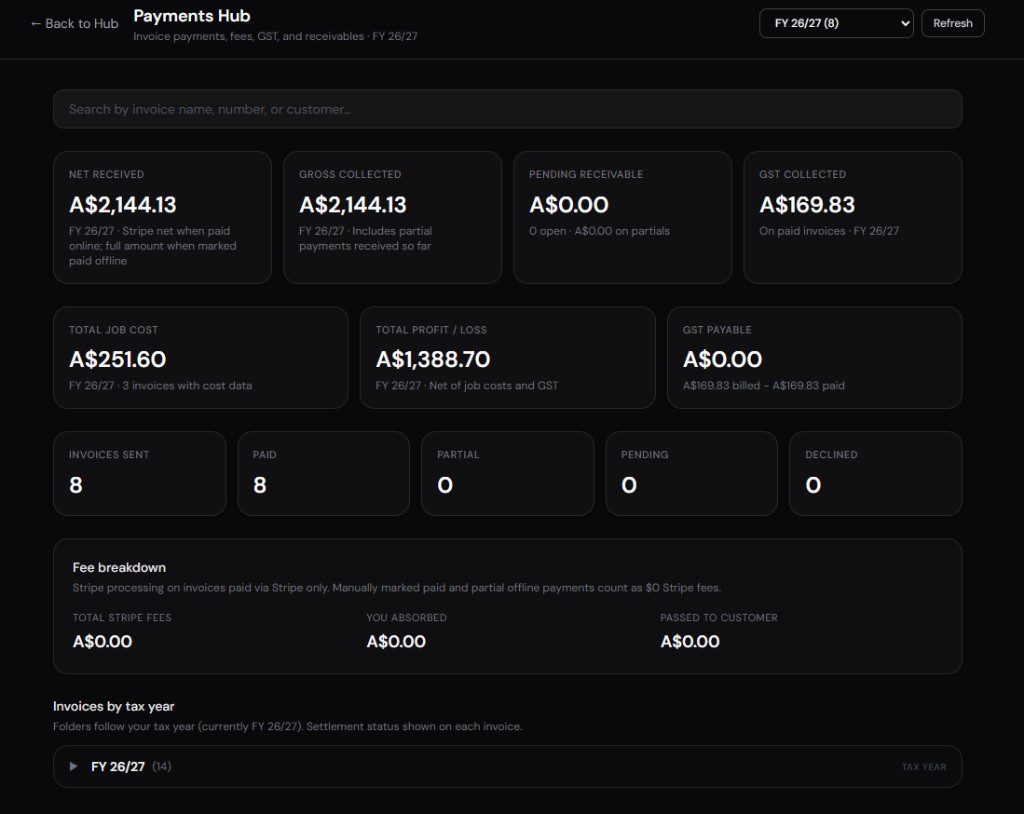
Signibly's Business plan (from $10/month AUD) is built specifically to replace the DocuSign-plus-Xero-plus-Expensify-plus-payment-plugin combination for small teams that do not need each tool's full enterprise depth — e-signatures, AI drafting, invoicing, payments, and expense tracking with receipt and invoice scans in one workspace and one client record.
Whatever you decide, run the numbers on your own stack first. The point of this article is not to sell a single answer — it is to make the hidden costs visible enough that the decision, whichever way it goes, is an informed one.
Is it really cheaper to consolidate apps?
Usually, yes, once you count subscription cost plus time spent on duplicate entry and context switching — but the exact saving depends on your team size and current stack. Run your own numbers before assuming.
Do I have to switch everything at once?
No. Most businesses consolidate one stage at a time — often starting with e-signatures and invoicing, then adding expense tracking once the first change becomes a habit.
What if my accountant prefers a specific bookkeeping tool?
Keep it. Consolidation does not require abandoning every existing relationship — many small teams keep their accountant's preferred software for tax lodgement while moving day-to-day signing, invoicing, and expenses into one workspace.
Does Signibly replace Dropbox or Google Drive entirely?
Not necessarily — Signibly includes Google Drive archive integration so completed documents sync to folders you already use, rather than forcing you to abandon existing file storage.
Related
Replace multiple subscriptions · Invoice Hub · Expenses Hub · Payments Hub · Signibly vs DocuSign · Pricing · Shelf-ware waste · Standalone tax · Hide unused features · Top 10 SMB software · FreshBooks vs Signibly · Track partial payments · DocuSign vs PandaDoc · AI document creation · PandaDoc vs SignNow · PandaDoc pricing 2026 · PandaDoc vs Adobe Sign · SignWell vs DocuSign · Signaturely vs DocuSign · Dropbox Sign & invoicing · eSignLive vs DocuSign · AI vs template contracts · AI fillable PDF guide · Complete document workflow · PandaDoc vs DocuSign vs Signibly · Best AI contract generators · 50 business documents checklist · AI vs lawyers for contracts · Client onboarding guide · Build a paperless business · Switch to Signibly AI · Scan receipts & invoices · Tax / BAS Hub · Get paid faster · Invoicing with e-signatures · Contracts + invoices hub · vs PandaDoc · vs Xero · vs FreshBooks · vs QuickBooks · vs SignNow · vs Zoho Books · Cheaper DocuSign alternative · All-in-one SMB software · Custom dashboards · All blog posts · All solutions · Compare vendors