Dropbox Sign Invoice: Does Dropbox Sign Do Invoicing?
Searching “Dropbox Sign invoice”? Short answer: Dropbox Sign can collect payment on some signed documents, but it is not full invoicing software. Here is what it does, what it does not, and what SMBs use instead.
Quick answer: can Dropbox Sign send an invoice?
No. A “Dropbox Sign invoice” is not a real product feature. Dropbox Sign (formerly HelloSign) is e-signature software. It can sometimes collect payment when someone signs — that is not the same as sending numbered invoices, GST/VAT lines, recurring bills, credit notes, or aged receivables.
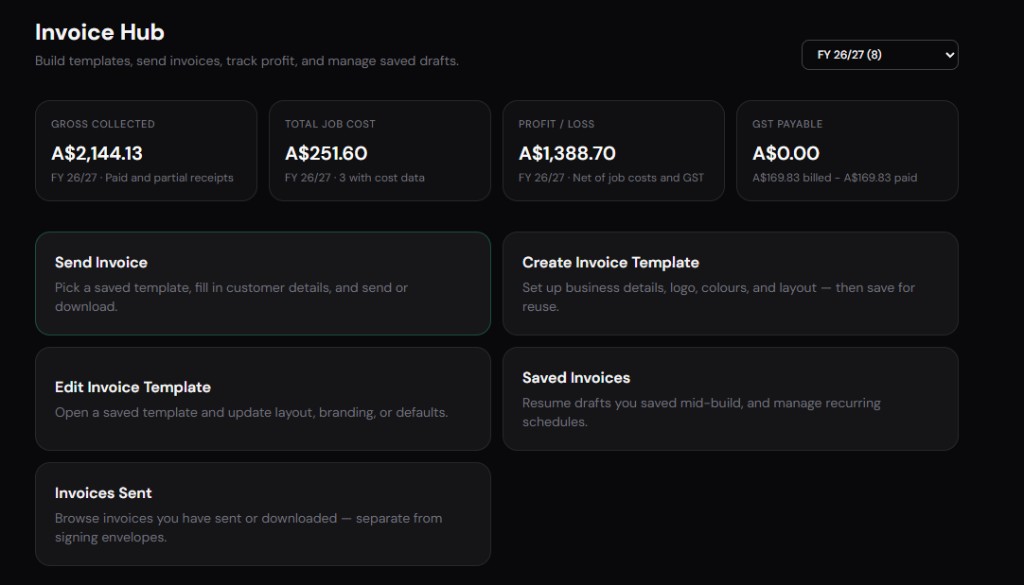
If you need sign → invoice → get paid in one place, keep Dropbox Sign for signatures and add invoicing software — or use a platform with both e-signatures and Invoice Hub (Signibly Business from $10/mo AUD).
The rest of this guide spells out exactly what Dropbox Sign covers near billing, where SMBs still need another app, and how to choose a stack without paying twice for the same job.
Why people search Dropbox Sign and invoicing together
Dropbox Sign — formerly HelloSign — is widely adopted for electronic signatures, especially among teams already using Dropbox for file storage. Natural next question: if clients sign here, can we also invoice here? Searchers typing "Dropbox Sign invoice" want one workflow from agreement to payment, not two logins and duplicated client records.
The short answer is nuanced. Dropbox Sign excels at signatures, templates, and some payment-request patterns — but it is not a full accounts receivable or invoice lifecycle platform for most small businesses.
This guide explains what Dropbox Sign actually covers in 2026, where invoicing still belongs elsewhere, and how teams consolidate signing with billing when fragmentation hurts cash flow.
HelloSign veterans sometimes expect invoicing because payment-request features blurred the line — clarify internally that payment-on-sign is not recurring invoice management before finance buys complementary tools twice.
The one-sentence summary
Dropbox Sign is an e-signature product — not an invoice hub — though it can collect payments in limited contexts tied to signed documents.
Recurring invoices, partial payment tracking, aged receivables, expense receipts, and tax-prep exports still require accounting software or an ops platform built for money movement after the deal.
If you signed up for Dropbox Sign hoping to retire FreshBooks or Xero for client billing, you will likely keep those tools — or switch to a platform that bundles signatures with Invoice Hub natively.
Invoice questions about Dropbox Sign are really quote-to-cash questions — start by mapping what happens after the signature email arrives in your inbox today.
What Dropbox Sign is built for
Dropbox Sign delivers template-based e-signatures, routing, reminders, audit trails, and API access for embedded signing. Dropbox storage integration lets teams attach signed PDFs to client folders automatically — valuable when files already live in Dropbox Business.
Team templates and admin controls suit agencies, SaaS companies, and professional services firms sending repeatable agreements. Signer experience is polished; mobile completion rates are strong for simple contracts.
Dropbox Sign does not attempt proposals with interactive pricing tables like PandaDoc, nor enterprise CLM like DocuSign upper tiers. It occupies a practical middle ground: better than email attachments, lighter than full sales document automation.
What Dropbox Sign offers near invoicing
Dropbox Sign supports payment collection in connection with certain document workflows — for example requesting payment when a signer completes a document, depending on plan and configuration. That is payment on a signed artifact, not a standing invoice series with line items, tax codes, and credit notes.
Think of it as "collect this amount now" rather than "manage this client's billing relationship for twelve months." Deposits and one-time fees map reasonably; recurring retainers and revision invoices map poorly.
Integrations with Stripe and similar processors bridge the gap for one-off charges. They do not replace invoice numbering discipline, GST reporting, or dashboards showing who owes what across dozens of clients.
Pricing in 2026 (directional)
Dropbox Sign pricing is typically per seat or per send tier — often from the mid-teens USD monthly for essentials-style team plans with template limits, climbing for API, SSO, and higher volume. Bundles with Dropbox Business affect effective cost if you already pay for storage.
Payment processing fees are separate — Stripe or PayPal take their cut on top of any Dropbox Sign subscription. Budget both when comparing to invoicing tools with native payment links.
Invoicing software pricing — FreshBooks, Xero, Invoice Ninja — adds another line item if Dropbox Sign only covers signatures. Total stack cost drives the business case for all-in-one alternatives.
Dropbox Sign vs invoicing software
The table contrasts signing-focused Dropbox Sign with what dedicated invoicing and ops platforms typically provide. Capabilities vary by plan — verify before buying.
| Capability | Dropbox Sign (typical) | Invoice / ops hub (typical) |
|---|---|---|
| Primary job | E-signatures & templates | Invoices, AR & payment tracking |
| Recurring invoices | Not native | Core feature |
| Partial payment tracking | Limited / not AR-focused | Payment status dashboards |
| Tax / GST line items | Not an invoice editor | Line-level tax codes |
| Payment on signed doc | Available in signing flows | Payment links on invoices |
| Expense & receipt capture | Not included | Receipt and invoice scan & categorise |
| Aged receivables report | Not included | Standard AR reporting |
| Credit notes & revisions | Not invoice-native | Invoice lifecycle tools |
| E-signatures | Core strength | Varies; often included in ops platforms |
| Best default audience | Teams needing compliant signing | Teams billing clients monthly |
Typical SMB workflow gaps
Gap 1 — Signed SOW, manual invoice: Client signs in Dropbox Sign; you copy amounts into Xero hours later. Risk of typos and delayed cash collection.
Gap 2 — Deposit then progress invoices: Signing collects a deposit once; milestone invoices live elsewhere with no unified payment status view.
Gap 3 — Job costing receipts: Field teams photograph receipts for materials; Dropbox Sign stores the contract PDF, not expense evidence tied to the job.
Gap 4 — Tax time: BAS or GST reporting pulls from invoice and expense systems — not from signature completion certificates.
Integrations that patch the gap
Zapier and native connectors can push signed document metadata into invoicing tools — client name, email, signed date. Automation helps but still requires an invoicing system on the other end.
Dropbox folder rules archive PDFs cleanly for accountants who manually raise invoices — workable at low volume, painful at thirty active clients.
CRM bridges help sales teams but finance still lives in accounting software unless you adopt a hub designed for both sides.
Real-world scenarios
Scenario A — Freelance fixed-fee project: One agreement, one final invoice. Dropbox Sign plus manual Xero invoice is tolerable — two tools, low volume.
Scenario B — Agency retainer: Signed MSA once, monthly invoices all year. Dropbox Sign does not replace recurring billing; invoicing software is mandatory.
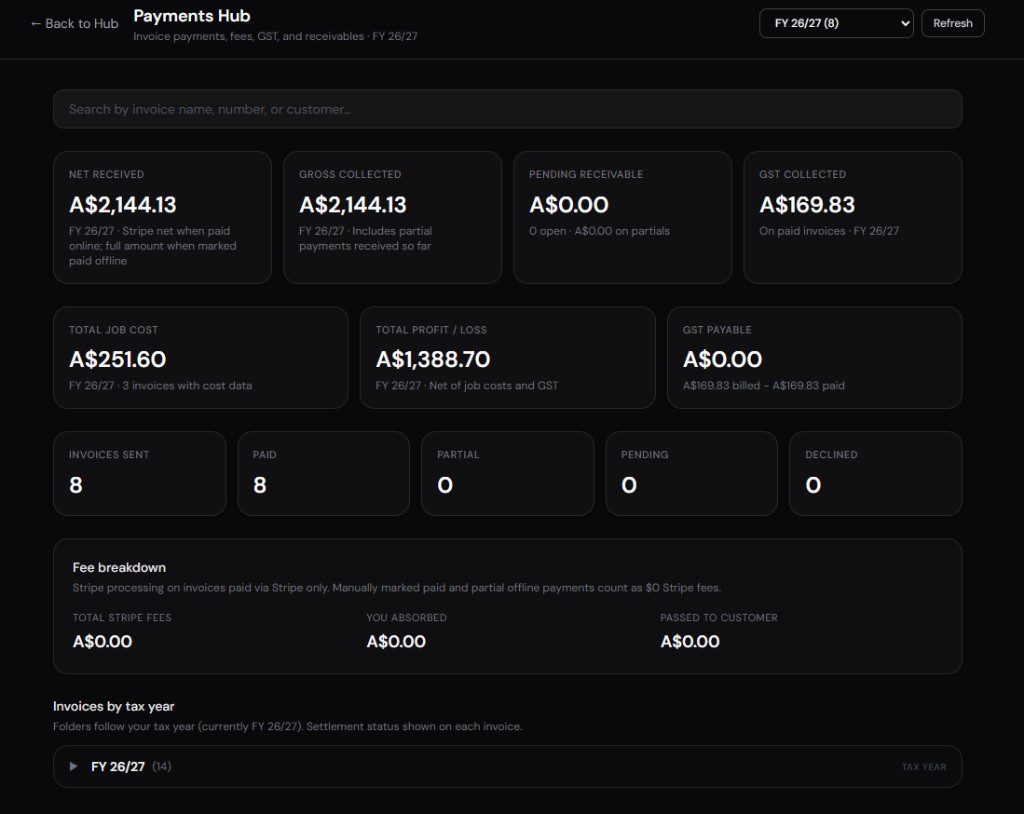
Scenario C — Tradie deposits and progress claims: Authority form signed on site; three progress invoices follow. Payment tracking across those invoices needs Payments Hub logic, not signature storage.
Scenario D — SaaS order form: Sign and initial charge may combine; ongoing subscription billing belongs in Stripe Billing or similar — not Dropbox Sign alone.
Dropbox Sign vs other signers on billing adjacency
DocuSign, Adobe Sign, and SignNow mirror the same pattern — strong signatures, weak native invoicing. PandaDoc collects proposal payments but is not a full AR platform after the deal closes.
Choosing among signers based on invoicing capability alone is the wrong axis — none win outright. Choose Dropbox Sign for Dropbox-centric file workflows and signature UX; choose invoicing tools for money ops.
Consolidation vendors compete by bundling both under one login — compare total subscriptions, not feature checklists in isolation.
Limitations worth knowing
Dropbox Sign will not replace invoice numbering, credit notes, recurring schedules, or BAS-style tax exports for most Australian and international SMBs.
Payment-on-sign features suit one-time charges better than complex billing relationships with partial payments and write-offs.
Teams paying for Dropbox Sign plus invoicing plus receipt apps should model Signibly — Free at $0/mo (3 envelopes, 1 manual invoice) for light use, or Business at $10/mo AUD (local currency at checkout, roughly $6.50 USD) with unlimited envelopes and invoices under fair use, Invoice Hub, Payments Hub, Expenses Hub, Tax/BAS, and 50 AI receipt and invoice scans. Signing and billing in one workspace reduces the "Dropbox Sign invoice" search frustration entirely for many SMBs.
Which approach should you choose?
Keep Dropbox Sign plus accounting software if signing volume is moderate, billing is simple, and your accountant prefers Xero or QuickBooks as the system of record.
Add automation between Dropbox Sign and invoicing if manual re-entry causes delays — but accept two subscriptions and integration maintenance.
Consider Signibly Business at $10/mo AUD if you want signatures with unlimited invoices under fair use, payment status visibility, expense capture, and tax-prep exports without stacking Dropbox Sign on top of a separate invoice product.
Audit one month of client jobs: count minutes from signed PDF archived to invoice sent and payment reconciled. The right stack minimizes that gap — whether or not Dropbox Sign remains in it.
Dropbox Sign renamed from HelloSign — older tutorials and integrations may still reference HelloSign; search both names when evaluating Zapier recipes or accounting connector documentation from prior years.
If finance spends more time on invoicing than you spend on signing, prioritise Invoice Hub improvements before switching signers — the bottleneck determines the best subscription change.
Dropbox storage and signed document archive
Dropbox Sign's strength in Dropbox-centric teams is automatic filing — signed PDFs land in client folders without manual download-upload loops. That helps accountants and agencies who already organise work by client directory structure in Dropbox Business.
Storage is not invoicing: a perfectly archived signed contract does not tell you which invoices are overdue, which deposits cleared, or which GST lines belong in this quarter's BAS. File organisation and accounts receivable are different mental models.
Retention policies should align with your industry — construction, healthcare, and financial services often require years of accessible records. Confirm Dropbox Sign completion storage duration and whether exporting to long-term archive is included or manual.
Building a quote-to-cash stack in 2026
Minimal stack: Dropbox Sign plus Xero or QuickBooks — works when signing volume is low and invoices are simple. Add Zapier when manual client re-entry becomes weekly frustration.
Mid stack: CRM for pipeline, Dropbox Sign for execution, invoicing for AR, expense app for receipts — four logins, four renewals, four places client name can typo.
Consolidated stack: one ops platform with e-signatures, Invoice Hub, Payments Hub, and Expenses Hub — fewer integrations to break when a vendor changes API pricing. Signibly Business at $10/mo AUD targets teams outgrowing the minimal stack without enterprise complexity.
Choose based on how many hours finance spends reconciling "signed but not invoiced" each month — that number usually predicts whether consolidation pays back within a quarter.
HelloSign legacy workflows and migration
Teams still searching "HelloSign invoice" may have legacy templates, bookmarks, and staff habits under the old brand. Dropbox Sign continuity is generally smooth, but retrain staff on renamed admin paths and update client-facing help docs that mention HelloSign.
Audit active integrations labelled HelloSign in Zapier or custom scripts — some connectors list both names; others require re-authentication after account migrations between Dropbox product SKUs.
If you migrated from HelloSign years ago but never fixed invoicing gaps, renaming the signer does not fix quote-to-cash — treat Dropbox Sign as a moment to redesign post-signature billing, not only rebrand envelopes.
Australian SMB tax and invoicing context
Australian businesses often need GST line items, BAS-friendly exports, and AUD-native client billing — none of which Dropbox Sign provides as core invoice features. Signed contracts establish obligation; tax-compliant invoices establish collectible debt in formats the ATO expects.
Partial payments on long jobs — common in construction and professional services — need Payments Hub visibility Dropbox Sign does not offer. Chasing balances via spreadsheet after a signed Dropbox envelope is manual labour you pay for in owner time.
Signibly Business at $10/mo AUD bills in local currency at checkout and includes Tax/BAS alongside Invoice Hub — relevant when "Dropbox Sign invoice" searches reflect frustration with USD-priced signers plus separate AUD accounting stacks.
Consult your accountant on whether signed PDFs alone satisfy engagement documentation for your industry — signing and tax reporting are related but not interchangeable compliance tasks.
Measuring quote-to-cash friction
Pick five recent client jobs and time each stage: agreement drafted, agreement signed, first invoice sent, first payment received, payment reconciled in accounting. Dropbox Sign may shorten stage two while stages three through five remain unchanged — that gap is what "Dropbox Sign invoice" searches usually target.
If stage three averages more than forty-eight hours after stage two, invoicing — not signing — is your bottleneck. Fixing it with Zapier helps; fixing it with Invoice Hub removes manual steps entirely.
Partial payments distort simple metrics — track outstanding balance per job, not only time-to-first-invoice. Payments Hub dashboards expose balances Dropbox Sign archives cannot see.
Re-measure quarterly as team size grows — friction that was tolerable for one founder becomes expensive at five project managers sending signed work orders daily.
Dropbox Sign invoice FAQ for ops leads
Ops leads searching "Dropbox Sign invoice" usually want one client record from signature through payment — Dropbox Sign stores the contract PDF; it does not maintain invoice numbers, credit notes, or aged receivables aging buckets.
Automations that create draft invoices from signed metadata still need a human to verify tax lines — half-automation sometimes increases errors if finance trusts Zapier field mapping blindly.
When Dropbox Business already includes Sign seats, marginal cost of Sign feels zero — but invoicing subscriptions remain separate unless you migrate to a hub that bundles both under Signibly Business at $10/mo AUD with Invoice Hub, Payments Hub, Expenses Hub, and Tax/BAS.
Dropbox Sign invoice searches peak after tax season when owners reconcile signed engagements against issued invoices — timing that suggests billing gaps, not signing gaps, drive the frustration.
Closing recommendation: keep Dropbox Sign when Dropbox-centric storage and moderate signing suffice; add Invoice Hub elsewhere when manual invoicing after every signed envelope hurts cash flow; or evaluate Signibly Business at $10/mo AUD to unify both under one login with Payments Hub and Tax/BAS included.
Searching "Dropbox Sign invoice" is a signal to fix quote-to-cash — start with where invoices are created today, not which signer logo appears on the contract.
Does Dropbox Sign do invoicing?
No. Dropbox Sign is an e-signature product. It may collect payment on some signed documents depending on plan and setup, but it does not create recurring invoices, GST/VAT invoice lines, credit notes, or aged receivables reports like invoicing software.
Can I send a Dropbox Sign invoice to a client?
Not as a native invoice product. You can send documents for signature and sometimes request payment with the signed document. For proper invoices with numbers, tax, and payment tracking, use Invoice Hub software or an all-in-one ops platform.
Can Dropbox Sign create invoices?
Dropbox Sign is not a full invoicing product. It can request payments in some signing workflows, but recurring invoices, tax line items, credit notes, and aged receivables reporting typically require dedicated invoicing or ops software.
Does Dropbox Sign integrate with invoicing tools?
Yes via Zapier, APIs, and manual export workflows — but integration is not the same as native Invoice Hub features. You still maintain a separate billing system of record.
Is Dropbox Sign enough for small business billing?
For one-off signed agreements with simple payment collection, sometimes. For ongoing client billing, partial payments, and tax reporting, almost always no — you need invoicing software or an all-in-one platform.
What is the best alternative for signing and invoicing together?
Evaluate ops platforms that bundle e-signatures with Invoice Hub and Payments Hub — Signibly publishes Free and Business plans with unlimited envelopes and invoices under fair use on Business — against your current Dropbox Sign plus accounting stack total cost.
Related
SignWell vs DocuSign · Signaturely vs DocuSign · PandaDoc pricing 2026 · Signibly vs Dropbox Sign · Invoicing with e-signatures · Pricing · Shelf-ware waste · Standalone tax · Hide unused features · Top 10 SMB software · FreshBooks vs Signibly · Track partial payments · DocuSign vs PandaDoc · AI document creation · PandaDoc vs SignNow · PandaDoc vs Adobe Sign · eSignLive vs DocuSign · AI vs template contracts · AI fillable PDF guide · Complete document workflow · PandaDoc vs DocuSign vs Signibly · Hidden cost of five business apps · Best AI contract generators · 50 business documents checklist · AI vs lawyers for contracts · Client onboarding guide · Build a paperless business · Switch to Signibly AI · Scan receipts & invoices · vs DocuSign · vs PandaDoc · vs Xero · vs FreshBooks · vs QuickBooks · vs SignNow · vs Zoho Books · Cheaper DocuSign alternative · Replace multiple apps · All-in-one SMB software · Custom dashboards · All blog posts · All solutions · Compare vendors