How to Track Partial Payments Without a Spreadsheet
Long jobs and deposit workflows break when payment status lives in email threads. Here is a simple way to track partial payments and overdue invoices without rebuilding Excel every week.
Why spreadsheets fail for partial payments
A tradie or agency sending deposit → progress → final invoices quickly outgrows a single "Paid?" column. Email threads do not show remaining balance. Bank feeds in accounting software lag behind the client conversation.
You need one place that knows the invoice total, what landed in Stripe or the bank, and what is still outstanding — tied to the same customer record.
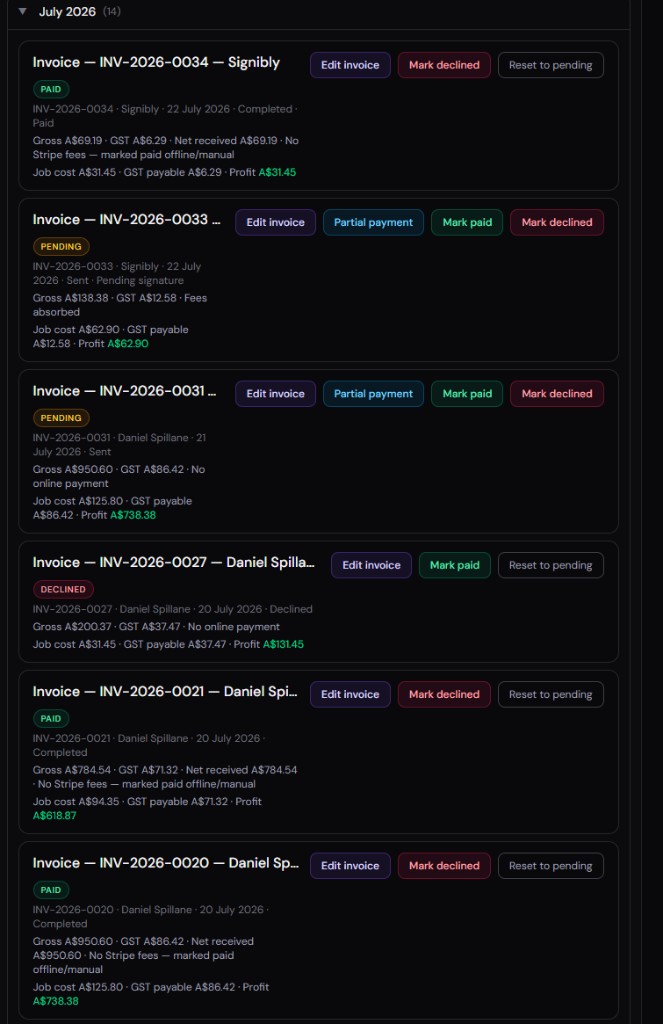
Deposits and progress bills in practice
Start with clear terms on the invoice: deposit required or pay in full. When the first payment arrives — online or offline — record it immediately so the remaining balance is visible to you and your admin staff.
Signibly Payments Hub supports partial settlement: mark what arrived, see what is left, and keep GST-style totals aligned with your tax period selector.
Offline bank transfers still count
Not every client pays by card. Mark paid or partial when the transfer lands — the audit trail stays on the invoice even when Stripe was not involved. That matters when a client disputes what they owe six months later.
Pair with job expenses
Partial payments tell you cash in; Expenses Hub tells you cash out on materials and subcontractors. Together they answer whether a long job is actually profitable before you send the final bill.
Do I need accounting software too?
Many businesses use Signibly for client billing and payment tracking, then export summaries to Xero, QuickBooks, or an accountant pack ZIP. Signibly is the operations layer — not a full ledger replacement.
Related
Get paid faster · Payments Hub guide · Invoice Hub guide · Pricing · Shelf-ware waste · Standalone tax · Hide unused features · Top 10 SMB software · FreshBooks vs Signibly · DocuSign vs PandaDoc · AI document creation · PandaDoc vs SignNow · PandaDoc pricing 2026 · PandaDoc vs Adobe Sign · SignWell vs DocuSign · Signaturely vs DocuSign · Dropbox Sign & invoicing · eSignLive vs DocuSign · AI vs template contracts · AI fillable PDF guide · Complete document workflow · PandaDoc vs DocuSign vs Signibly · Hidden cost of five business apps · Best AI contract generators · 50 business documents checklist · AI vs lawyers for contracts · Client onboarding guide · Build a paperless business · Switch to Signibly AI · Scan receipts & invoices · Expenses Hub · Tax / BAS Hub · Invoicing with e-signatures · Contracts + invoices hub · Freelancers · Small businesses · Replace multiple apps · All-in-one SMB software · Client management · Cheaper DocuSign alternative · All blog posts · All solutions · Compare vendors