The Best AI Contract Generators in 2026
ChatGPT, Claude, Gemini, LegalZoom AI, and Signibly AI compared for contract drafting in 2026 — where each excels, and why Signibly wins on the draft-to-fields-to-send loop.
Why "AI contract generator" means different things to different searchers
Type "AI contract generator" into a search bar and you could mean any of several very different needs: a quick clause explained in plain English, a full first draft of a service agreement, a document with fields already placed for e-signature, or a legally reviewed template from a service with actual attorneys behind it.
General-purpose chatbots — ChatGPT, Claude, Gemini — can all produce contract-shaped text on request. Specialised legal-document services like LegalZoom layer templates and, in some tiers, human or attorney review on top. Signibly AI sits in a third category: purpose-built for turning a short wizard into a signing-ready envelope, not just a block of text.
This guide compares them honestly, including where general chatbots are genuinely strong, because pretending otherwise would not serve small business owners trying to pick the right tool for a specific job — drafting text, versus producing something ready to send for signature.
How we are evaluating these tools
Four things matter for a small business contract workflow: how structured the drafting process is, a guided wizard versus a single vague prompt; how close the output is to something you could actually send, versus something you must reformat yourself; whether signature and form fields can be placed automatically; and what happens after the draft — can you test signers, send an envelope, and get paid, or do you export and start over in another product.
We are not evaluating raw legal accuracy in depth here — that requires qualified legal review regardless of which tool drafts the first version, and no AI tool reviewed below should be treated as a substitute for that review on anything beyond routine, low-stakes agreements.
Pricing is noted directionally; subscription tiers for general AI assistants and legal-document services both change frequently.
ChatGPT for contract drafting
ChatGPT (OpenAI) is the most commonly used general AI assistant for a first-pass contract draft, and it is genuinely capable at producing readable clause language for common agreement types — NDAs, simple service agreements, basic terms of service — when given a clear, detailed prompt.
Its weakness for this specific job is structure: there is no guided wizard collecting jurisdiction, party roles, or clause preferences — you are responsible for prompting thoroughly and remembering what to ask for, and the output is plain text with no fields, no layout, and no path to e-signature.
ChatGPT is a strong starting point for a rough draft or for explaining what a clause means in plain English. It stops being useful the moment you need the document to become a signed, sendable agreement — that requires exporting, formatting, and uploading to a separate signing tool.
Claude for contract drafting
Claude (Anthropic) produces similarly strong contract-shaped prose to ChatGPT, with a reputation among some users for more careful, hedged language around legal caveats — useful when you want the AI to flag ambiguity rather than confidently assert a clause is standard when it may not be for your jurisdiction.
Like ChatGPT, Claude has no built-in structured wizard for contract-specific inputs and no native path to fields or e-signature. You are drafting in a chat window and exporting manually, same as any general assistant.
Claude can be a good second opinion on a draft produced elsewhere — paste a contract and ask it to flag missing clauses or ambiguous wording — even if it is not the tool you use to produce the final sendable document.
Gemini for contract drafting
Google's Gemini offers comparable general drafting capability, with the practical advantage of tight integration into Google Docs for teams already living in that ecosystem — a draft can move from chat to a formatted document without leaving Google's tools.
That Docs integration is Gemini's main edge for this use case: formatting is less painful than copying from a chat window into a word processor. It still lacks a contract-specific wizard, jurisdiction-aware blueprints, or any native field-placement and e-signature capability.
For a business already paying for Google Workspace, Gemini is a reasonable way to get a first draft into a shareable document quickly — but the document still needs to be exported to a dedicated e-signature tool before anyone can sign it.
LegalZoom AI and other specialised legal-document generators
LegalZoom and similar legal-document services — Rocket Lawyer and others fall in the same category — built their business on template libraries reviewed with more legal rigor than a general chatbot, and some now layer AI drafting assistance on top of those templates, with optional paid attorney review tiers.
The strength here is template pedigree — documents built against known legal structures rather than generated fresh from a language model's general training. For businesses that want the reassurance of a legal-document company standing behind the template, that pedigree has real value, especially for higher-stakes documents like wills, incorporation paperwork, or specific state-compliant forms.
The trade-off is flexibility and workflow integration: these services are typically priced per document or per subscription tier separate from any signing or invoicing tool you use, and the output usually still needs to be exported to a separate e-signature platform. They solve getting a legally-templated document well; they do not solve getting it signed and paid in the same workspace.
Other specialised AI contract tools worth knowing
Beyond the general chatbots and legal-document services, a category of specialised contract AI tools — Ironclad, Juro, Spellbook, and Lawgeex among others — targets legal teams and contract-heavy enterprises with AI-assisted review, clause extraction, and negotiation playbooks layered on top of a contract lifecycle management platform.
These tools are generally built for organisations with an in-house legal team reviewing high contract volumes, not for a freelancer or small business drafting a handful of agreements a month. Pricing typically reflects that audience — enterprise contracts and per-seat licensing rather than a small business monthly plan.
Spellbook in particular is worth knowing about for solo lawyers and small legal practices: it works inside Microsoft Word to suggest clause language and flag risk during drafting and review, which is a genuinely different use case from generating a document from scratch — it assumes you already have a lawyer doing the drafting and want AI assistance during that process.
For most small businesses without in-house legal counsel, these specialised tools solve a problem one step removed from the one this guide addresses — reviewing contracts at scale, rather than drafting and sending routine commercial agreements quickly.
Jurisdiction awareness: why generic AI drafts get local law wrong
A general chatbot asked to draft a residential tenancy agreement will produce plausible-sounding clauses — but "plausible" and "matches your state or country's actual tenancy law" are not the same thing. Bond limits, notice periods, and disclosure requirements vary significantly by jurisdiction, and a model trained on a broad mix of documents from many regions can blend conventions in ways that look correct but are not locally accurate.
This is the single biggest risk of using a general chatbot for anything beyond a rough first draft on documents with jurisdiction-specific legal requirements — leases, employment contracts, and consumer-facing agreements chief among them. The model does not know, by default, which jurisdiction's rules should apply unless you specify it explicitly and verify the output against that jurisdiction's actual requirements yourself.
Signibly AI's jurisdiction-aware blueprints exist specifically to reduce this risk for common document types — an Australian residential tenancy draft follows a structure recognisable under Australian conventions rather than a blended, generic template. This narrows the risk; it does not eliminate the need for review, particularly for anything with unusual terms or a jurisdiction with less common requirements.
Whichever tool drafts the document, the safest habit is the same: state your jurisdiction explicitly, and have someone who knows that jurisdiction's rules review the draft before it is sent for signature — especially for tenancy, employment, and consumer agreements where regulatory requirements are strict and change periodically.
Data privacy and confidentiality considerations
Pasting a client's draft contract, a counterparty's confidential terms, or personal information into a general-purpose chatbot raises real questions about where that data goes, whether it is used for model training, and whether it violates a confidentiality clause in the very document you are drafting or reviewing. Policies differ by provider and by whether you are on a free or paid tier — check current terms before pasting anything genuinely sensitive.
This is not a hypothetical concern for small businesses handling NDAs, employment agreements, or any document containing another party's confidential business information. An NDA that prohibits disclosing its own terms to third parties creates an awkward compliance question if its contents were pasted into a general AI chat tool without checking that provider's data handling terms first.
Purpose-built contract tools generally publish clearer terms about how document content is used and stored, since handling sensitive business documents is their core function rather than a side effect of a general-purpose product. Whichever tool you use, read the actual data handling terms — not just the marketing page — before drafting anything containing a third party's confidential information.
A practical test: drafting the same NDA five ways
To make this comparison concrete rather than theoretical, consider drafting the same mutual NDA — two parties, standard confidentiality term, two-year duration — across each option discussed in this guide. ChatGPT, Claude, and Gemini each produce a workable draft within a minute or two once prompted with the specifics, but each requires you to supply the structure yourself and then manually format, add fields, and upload elsewhere to collect a signature.
A legal-document service produces a template-backed draft, typically after answering a short questionnaire, with the reassurance of a maintained template library behind it — but still ends with a document you export and sign somewhere else.
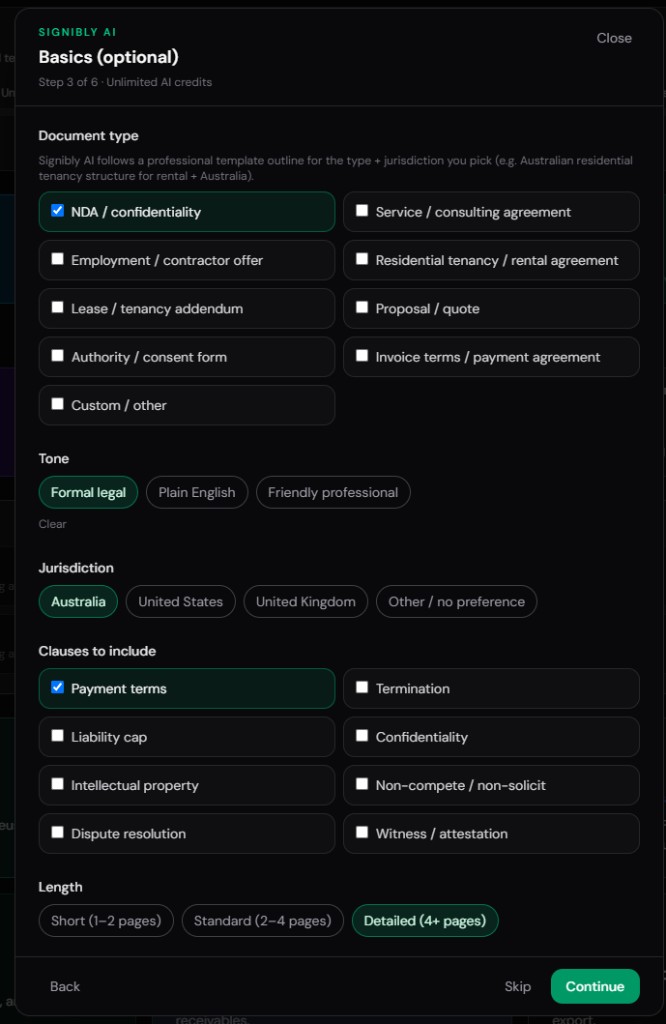
Signibly AI's wizard asks for the same specifics — parties, jurisdiction, duration, mutual or one-way — and produces a laid-out draft with signature fields already placed for both parties, ready to test and send from the same session. For this specific document type, the practical time difference between "I need an NDA" and "it is out for signature" is the clearest illustration of what the draft-fields-send loop actually saves.
Run this test yourself with a document type you send often. The quality of the drafted prose across tools is closer than marketing pages suggest for routine agreements — the real difference shows up in what happens in the ten minutes immediately after the draft is finished.
Cost per contract: a rough calculation
A general AI chatbot subscription at roughly $20 USD a month, used for ten contracts, costs about $2 per contract in subscription terms alone — before counting the time spent manually formatting, placing fields, and uploading to a separate e-signature tool for each one.
A legal-document service charging per document can range from moderate to significant per template depending on complexity and whether attorney review is included — a reasonable cost for documents that specifically benefit from that reassurance, less economical for routine, repeated agreement types.
Signibly Business at $10/month AUD (roughly $6.50 USD) covers unlimited envelopes and invoices under fair use plus a monthly AI credit pool for drafting and field scans — for a business sending ten or more contracts a month, the effective cost per contract falls well below a dollar once volume is accounted for, on top of already including the e-signature step the other options still require you to source separately.
The right comparison is never subscription cost alone — it is subscription cost plus the manual steps each option still leaves you to complete elsewhere. Calculate both before deciding which tool actually saves your business money and time.
Signibly AI
Signibly AI approaches the same problem from the opposite end: instead of optimising for the richest possible drafting conversation, it optimises for the shortest path from needing a document to having it signed and paid. A structured wizard collects document type, party roles, jurisdiction, length, tone, and optional clauses — not a single freeform prompt you have to construct yourself.
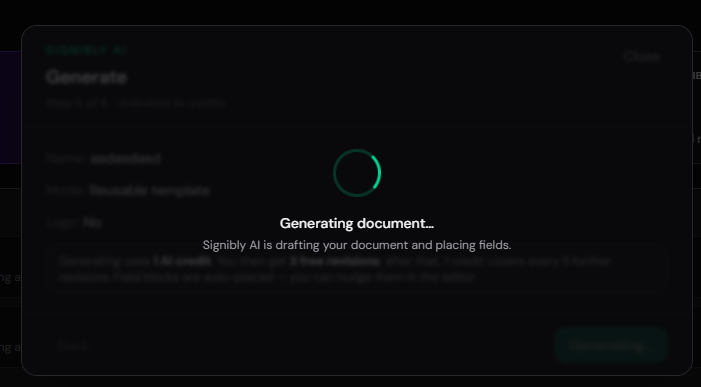
The output is page-laid-out drafts with signature and form fields already placed near the relevant text, party colours assigned automatically, and a review workspace for revisions before send. Free revisions are included in the first round; further revision batches use AI credits from the same monthly pool as receipt and invoice scanning.
Signibly AI also handles the case none of the chatbots or legal-document services solve: a PDF someone else already sent you. Upload it, choose Auto-generate fields, and Signibly scans up to 20 pages in high-detail batches of six, placing fields on visible blanks and underlines — separating multiple "Client" blocks into Client 1, Client 2, and so on automatically.
Signibly AI is not a solicitor, and Signibly does not claim broader legal pedigree than a dedicated legal-document service — it claims something narrower and, for most small business use cases, more useful: the fastest route from draft to a testable, sendable, payable envelope.
Side-by-side comparison
General AI chatbots are grouped together below since ChatGPT, Claude, and Gemini share the same structural gaps for this specific job — a freeform prompt with no native fields or e-signature path.
| Capability | General AI chatbots | LegalZoom-style services | Signibly AI |
|---|---|---|---|
| Structured input (wizard vs prompt) | Freeform prompt only | Template questionnaire | Guided wizard + jurisdiction blueprints |
| Output format | Plain text / chat | Formatted document / PDF | Laid-out pages with fields |
| Auto-place signature fields | Not available | Rare | AI scan, 1 credit / 6 pages |
| Works on PDFs you already have | Manual copy/paste only | Not typical | Auto-generate fields on upload |
| Test signers before send | Not applicable | Not applicable | Preview as any party freely |
| Path to e-signature | None — export elsewhere | None — export elsewhere | Native, same workspace |
| Invoice & get paid after signing | Not applicable | Not applicable | Invoice Hub + Payments Hub |
| Typical pricing | General AI subscription, ~$20 USD/mo | Per-document or subscription fees | Business from $10/mo AUD + AI credits |
Speed comparison: prompt to sendable document
Measured end to end — from opening the tool to having something you could actually put in front of a client for signature — general chatbots are fastest at producing text, often under a minute for a straightforward agreement, but slowest overall once you count manual formatting, exporting, and uploading to a separate e-signature tool, which routinely adds another ten to twenty minutes depending on document complexity.
Legal-document services fall in the middle: the questionnaire takes a few minutes longer than a single chat prompt, but the output is already formatted as a document, reducing (though not eliminating) the export-and-reformat step before it can be sent for signature elsewhere.
Signibly AI's wizard takes a comparable few minutes to the legal-document questionnaire, but the output already has fields placed and is ready to test and send from the same session — collapsing the ten-to-twenty-minute formatting and re-upload step that both other categories still require into essentially zero additional time.
For a one-off document, these differences amount to a few minutes either way. For a business drafting and sending a dozen or more agreements a month, the accumulated time saved from skipping the export-and-reupload step becomes hours, not minutes, by the end of the month.
Editing and revision workflows across tools
Revising a chatbot-drafted contract typically means going back to the chat, asking for a change, and re-exporting the entire document — there is no persistent "document object" being edited, just a new response each time, which makes tracking exactly what changed between versions harder than it should be.
Legal-document services generally let you edit fields within their template structure directly, which handles simple changes well but can be restrictive if you want to add a clause or restructure a section the template was not built to accommodate.
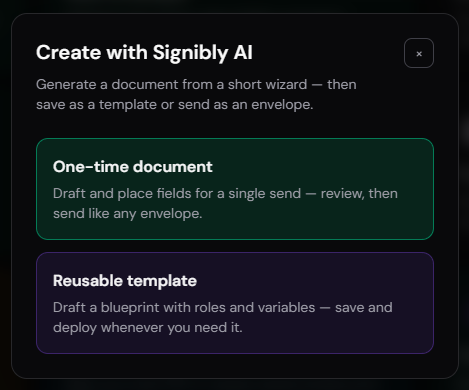
Signibly's revision workflow treats the drafted document as a persistent object you request changes to directly inside the same workspace — the first round of revisions is included, and further rounds draw from the same AI credit pool, with the field placements carrying forward rather than needing to be redone after every text change.
Whichever tool you use, keep a simple habit: read the full document after every revision round, not just the section you asked to change. AI-assisted edits occasionally introduce small inconsistencies elsewhere in the document that are easy to miss if you only check the paragraph you specifically requested changed.
Where general chatbots genuinely excel
It would be dishonest to frame ChatGPT, Claude, and Gemini as simply worse at this job — they excel at things Signibly AI does not attempt: open-ended legal questions, explaining what a clause means in plain English, brainstorming edge cases a template might miss, and drafting one-off document types so unusual that no structured wizard could anticipate them.
If your need is understanding a clause a client sent you, or drafting an unusual one-off letter that does not fit any standard category, a general chatbot's flexibility is genuinely more useful than a structured wizard built around common document types.
Many small business owners use both: a general chatbot for research, explanation, and unusual edge cases, and a structured tool like Signibly AI for the recurring, sendable documents — service agreements, NDAs, standard engagement letters — that make up most of their actual contract volume.
Where Signibly wins: the draft-fields-send loop
The single differentiator that matters most for small business contract volume is the unbroken loop: draft or scan, fields auto-placed, revise, test every signer role, send with signing order and audit trail, then invoice and collect payment — all inside one workspace, with one client record.
General chatbots end at a block of text. Legal-document services end at a formatted PDF. Both leave you to open a second product, re-upload the file, manually place fields, and separately again issue an invoice once the contract is signed. Signibly AI is built so that hand-off never has to happen.
For a business sending a dozen agreements a month, that unbroken loop is worth more in saved admin minutes than any marginal difference in prose quality between AI models — which, for standard commercial contract language, is smaller than most people assume.
Team and collaboration features
A solo user rarely needs more than a single login and a document history. A growing team needs to know who drafted a contract, who approved the final wording, and who actually sent it — and general chatbots offer essentially none of this, since a chat history tied to one person's account is not a shared, auditable drafting record for a team.
Legal-document services vary by plan — some offer shared team accounts and document libraries on business tiers, closer to what a small legal or operations team actually needs for consistency across multiple staff drafting similar documents.
Signibly's Team Folders and shared templates give a growing business a consistent starting point across staff, plus permission controls over who can send client-facing envelopes versus who can only prepare drafts — relevant the moment a business grows past a single person handling every contract personally.
If you are currently a team of one evaluating these tools, this section may not matter yet — but it is worth considering before committing to a workflow that will need to scale to a second or third person handling contracts within the tool's working life for your business.
Cross-checking an AI draft before you send it
Regardless of which tool produced the draft, a short manual review checklist catches most of the errors that matter: confirm the correct legal names and addresses of every party, confirm the jurisdiction stated matches where the agreement will actually be enforced, confirm dollar amounts and payment terms match what was actually negotiated, and read every clause once fully rather than skimming for the sections you expect to have changed.
Pay particular attention to defined terms and cross-references — AI-generated documents occasionally introduce a defined term early and then fail to use it consistently later, which reads fine at a glance but can create genuine ambiguity in a dispute. A careful read-through, not a skim, is the cheapest insurance available before any document goes out for signature.
This review step takes a few minutes and applies equally whether the draft came from ChatGPT, a legal-document service, or Signibly AI. No amount of AI drafting sophistication removes the value of a human actually reading the final document before asking someone else to sign it.
What none of these tools should replace
Every tool in this comparison, Signibly included, drafts practical documents for common situations — none of them replace a lawyer for complex, high-value, or regulated agreements. Employment contracts with unusual termination terms, cross-border IP assignment, and anything with real litigation exposure deserve qualified legal review regardless of which AI produced the first draft.
Treat every AI-generated clause as a strong, fast starting point — read every page before sending, and budget for an actual lawyer's time on anything where getting it wrong would cost more than the legal fee to get it checked.
The honest pitch for AI contract generators in 2026 is speed and structure for routine agreements, not a replacement for legal judgment on the agreements that matter most.
How AI contract generators will likely change from here
General AI models continue to improve at following structured instructions, which will likely narrow the gap between "chat with a general model" and "use a structured wizard" over the next few product cycles — but the fields, signature workflow, and downstream invoicing are product decisions, not model capability, and general chatbot vendors have shown limited interest in building full e-signature and billing infrastructure on top of their assistants.
Expect specialised legal AI tools to keep pushing further into contract review and negotiation assistance for legal teams, while purpose-built small business tools like Signibly continue optimising the opposite end of the market — reducing the number of steps between "I need this document" and "it is signed and paid" for businesses without dedicated legal staff.
The practical advice for small business owners does not change much with these shifts: pick the tool that matches today's actual workflow, re-evaluate periodically as your business grows or your needs change, and do not wait for a hypothetical future version of any tool when a real, current option already solves the problem you have this month.
A quick checklist before you draft your next contract
Before opening any AI tool for your next agreement, confirm four things in your own head first: which jurisdiction actually applies, whether this document type is routine enough for AI-assisted drafting or complex enough to need a lawyer from the outset, whether the document contains any counterparty confidential information that affects which tool is appropriate to paste it into, and what needs to happen immediately after signature — filing, invoicing, or nothing at all.
Those four answers determine the right tool faster than any feature comparison table. A routine NDA with no confidentiality concerns and an invoice to follow points toward Signibly AI's draft-fields-send loop. An unusual one-off letter with no signature requirement points toward a general chatbot. A high-stakes filing with jurisdiction-specific requirements points toward a legal-document service or a lawyer directly.
Revisit this checklist periodically as your business changes — a solo freelancer's routine NDA today might become a multi-party licensing agreement worth a lawyer's time next year as the business and its typical deal size both grow.
Which should you choose?
Choose a general chatbot — ChatGPT, Claude, or Gemini — when you need to research a clause, draft an unusual one-off document, or get a second opinion on wording, and you are comfortable formatting and signing elsewhere.
Choose a legal-document service like LegalZoom when you specifically want template pedigree or optional attorney review for a higher-stakes personal or business filing.
Choose Signibly AI when your recurring need is service agreements, NDAs, or similar commercial documents that need to become signed, tracked, and eventually invoiced — with Business plans from $10/month AUD including the monthly AI credit pool that powers both drafting and field scans.
Many small businesses end up using more than one: a chatbot for the odd question, Signibly AI for the recurring, sendable contract volume that actually needs to become a signature and an invoice.
Can ChatGPT create a legally binding contract?
ChatGPT can draft contract language, but it does not place signature fields or manage e-signature — the document only becomes legally binding once properly executed, typically through a dedicated e-signature tool.
Is Signibly AI better than ChatGPT for contracts?
Signibly AI is better for producing something you can actually send for signature — fields already placed, party roles coloured, and a path to send, invoice, and get paid. ChatGPT is better for open-ended questions and one-off document types.
Does LegalZoom offer AI contract drafting?
Some legal-document services now include AI-assisted drafting on top of their template libraries, often with optional paid attorney review tiers — check current offerings directly, as these change frequently.
How much does Signibly AI cost?
Signibly AI drafting and field scans draw from the same monthly AI credit pool included on Business ($10/month AUD); free welcome field scans are included on first paid activation, and extra AI credit packs never expire.
Related
Signibly AI guide · Templates · E-Signatures · AI document creation · Signibly vs DocuSign · Pricing · Shelf-ware waste · Standalone tax · Hide unused features · Top 10 SMB software · FreshBooks vs Signibly · Track partial payments · DocuSign vs PandaDoc · PandaDoc vs SignNow · PandaDoc pricing 2026 · PandaDoc vs Adobe Sign · SignWell vs DocuSign · Signaturely vs DocuSign · Dropbox Sign & invoicing · eSignLive vs DocuSign · AI vs template contracts · AI fillable PDF guide · Complete document workflow · PandaDoc vs DocuSign vs Signibly · Hidden cost of five business apps · 50 business documents checklist · AI vs lawyers for contracts · Client onboarding guide · Build a paperless business · Switch to Signibly AI · Scan receipts & invoices · vs PandaDoc · vs Xero · vs FreshBooks · vs QuickBooks · vs SignNow · vs Zoho Books · Cheaper DocuSign alternative · Replace multiple apps · All-in-one SMB software · Custom dashboards · All blog posts · All solutions · Compare vendors