How to Build a Paperless Business
Digital signatures, AI-drafted documents, cloud invoicing, digital expense tracking, and automated backups — a practical, step-by-step guide to running a small business without a filing cabinet.
What paperless actually means for a small business
Going paperless is not really about paper. Most small businesses printed very little to begin with; the real goal is eliminating the manual, disconnected steps that paper habits leave behind even after the printer stops running: scanning a signed page back into a file, retyping a receipt into a spreadsheet, storing a lease in a filing cabinet that only one person has the key to. A business can own zero printers and still be running a fundamentally paper-shaped process.
A genuinely paperless business treats every document — contracts, invoices, receipts, leases, HR paperwork — as data from the moment it is created, not as an image of a physical object. That distinction matters because data can be searched, backed up, reused, and connected to other records automatically, while a scanned image of a paper document usually just sits there looking exactly like the paper version it replaced.
This guide walks through eight practical steps to get there: replacing wet-ink signing, drafting documents digitally instead of pulling static templates, moving invoicing fully digital, digitising expense tracking, centralising storage, keeping compliance and audit trails intact, protecting the business with backups, and automating the repetitive parts once the foundation is in place. It closes with a realistic thirty-day rollout plan rather than an all-or-nothing switch.
Why most partial attempts at going paperless stall halfway
Many small businesses have already attempted some version of going paperless and quietly reverted, usually without fully realising it. A common pattern: signing moves digital, but contracts are still drafted in a word processor and manually re-typed for each client. Invoicing moves to an online tool, but the invoice line items are manually copied from a separate quote document rather than generated directly from it. Each individual step looks like progress, but the underlying manual re-entry between steps never actually goes away, it just moves.
The businesses that get further with a paperless transition tend to be the ones that treat the eight steps below as one connected system rather than eight separate purchasing decisions, prioritising how well a new tool connects to the ones already in place over any single feature in isolation. A tool that is only slightly less capable on paper but shares data with the rest of your workflow is usually a better choice than a more feature-rich tool that operates as an island.
Step 1: Replace wet-ink signing with e-signatures
Physical signatures are usually the first paper habit to go, and for good reason: they are the easiest to replace with something strictly better. E-signatures are faster to collect, harder to lose, automatically timestamped, and in most jurisdictions carry the same legal weight as a signature on paper, provided the platform captures identity and consent appropriately.
The upgrade is not just no printer needed. A proper e-signature workflow adds signing order for multi-party documents, automatic reminders for slow signers, an audit trail proving who signed what and when, and for higher-stakes documents, an e-witness step. None of that is possible with a printed page and a pen, which is why e-signatures are not simply a paperless equivalent of wet-ink signing; they are a meaningful upgrade on top of it.
Step 2: Draft documents digitally instead of pulling static templates
A common half-measure is going paperless on signing while still starting every new contract from a template saved somewhere on a shared drive, manually edited for each new client. That is still a largely manual, error-prone process; it just happens to end in a digital file instead of a printed page.
The fuller version of this step replaces the static template with AI-assisted drafting: answer a short set of structured questions about the document type, parties, and jurisdiction, and receive a properly formatted draft with fields already placed for signing. Signibly AI does this directly inside the same workspace used for sending the document, so drafting and signing are two steps in one flow rather than two separate tools.
What jurisdiction-aware drafting adds to a paperless workflow specifically
A paperless business that operates across more than one state or country runs into a subtler version of the paper problem: instead of a physical filing cabinet with the wrong version of a document in it, it has a digital template folder with the wrong jurisdiction version in it, discovered only when a document drafted for one location gets sent, unmodified, to a client or employee in another. Digital does not automatically solve this; it just changes where the same mistake can happen.
Jurisdiction-aware drafting closes this specific gap by making jurisdiction an explicit, required input every time a document is generated, rather than an assumption baked silently into whichever template happened to be open. For a paperless business with any multi-location complexity, this is arguably a bigger practical win than the paper reduction itself, since the cost of a jurisdiction mismatch, a missing clause, or an outdated notice period is usually far higher than the cost of printing a page.
Step 3: Move invoicing fully digital
Digital invoicing means more than emailing a file instead of mailing a paper bill. It means invoices are generated from structured data — client details, line items, tax rates — rather than typed fresh each time, payment status is tracked automatically instead of manually checked against a bank statement, and reminders for overdue invoices go out without someone remembering to send them.
A fully digital invoicing setup also closes the loop with signed contracts: when a service agreement completes signing, the invoice can be generated immediately from the same contract data, with no risk of a typo introducing a mismatch between what was signed and what is billed. That connection between signing and invoicing is one of the most valuable and most commonly missed pieces of a paperless setup.
Why signing and drafting need to be connected, not just both digital
It is possible to have a fully digital signing tool and a fully digital drafting process and still lose most of the paperless benefit if the two do not talk to each other. A document drafted in one tool, exported, and re-uploaded into a separate signing tool reintroduces a manual handoff step, along with the associated risk of uploading the wrong version, missing a last-minute edit, or placing fields inconsistently between the two systems.
When drafting and signing live in the same workspace, a revision made to the document content and a field placement adjustment happen against the same live draft, and sending for signature is the natural next action rather than a separate export-and-reupload task. This connection is a small detail on paper but tends to be the difference between a paperless workflow that actually feels faster day to day and one that is merely digital in name while still carrying most of the friction of the paper process it replaced.
Step 4: Digitise expense tracking and receipts
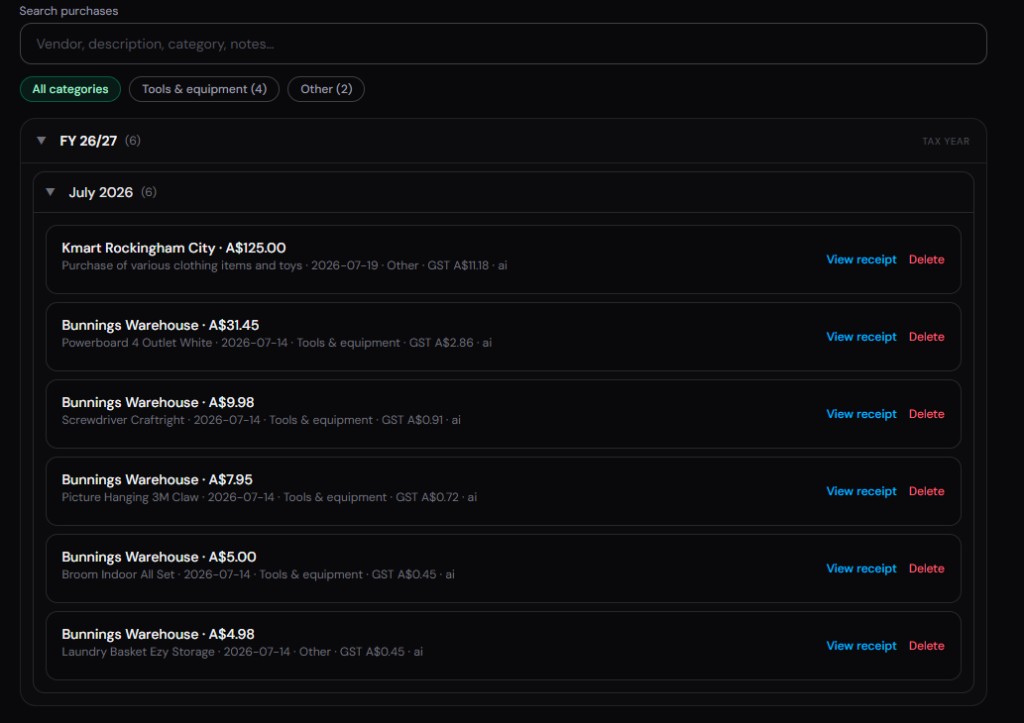
Receipts are one of the last genuinely physical documents most small businesses still deal with, usually crumpled in a wallet or a shoebox until tax time forces a reckoning. Digitising this step means capturing a receipt the moment a purchase happens, a phone photo is enough, rather than trying to reconstruct months of spending from memory and bank statements later.
AI-assisted expense scanning takes this further by extracting the merchant, amount, date, and category directly from a photographed receipt, turning a physical piece of paper into a structured expense record without manual data entry. When expenses, invoices, and tax summaries share the same underlying data model, quarterly reporting becomes a matter of reviewing pre-categorised numbers instead of reconstructing them from a pile of receipts every few months.
The hidden cost of half-digital expense tracking
A surprising number of businesses that consider themselves paperless still handle expenses in a half-digital way: receipts are photographed, but the amounts are then manually typed into a spreadsheet or accounting tool by someone reading each photo individually. This is a genuine improvement over a shoebox of paper receipts, but it still consumes real staff time every week and remains prone to the same transcription errors as manual paper-based bookkeeping, just with a photo as the source instead of a physical slip.
Fully digital expense tracking removes this remaining manual step by extracting the merchant, amount, date, and category directly from the photographed receipt using AI vision, so the only human involvement is a quick confirmation rather than a full manual entry. For a business processing dozens of receipts a month, this difference between photographing and truly digitising typically represents several hours of recovered time, which is exactly the kind of hidden cost this guide is trying to help identify and remove.
Step 5: Centralise documents in cloud storage
A paperless business still needs a filing system; it just needs to be digital, searchable, and accessible to the right people from anywhere. Scattering contracts across email attachments, invoices in an accounting tool, and receipts in a phone gallery recreates the same where-did-we-put-that problem paper filing had, just spread across more places at once.
Team folders with proper permissions solve this by giving each client, project, or category a single home for every related document, visible to the people who need it and hidden from those who do not. This matters more as a business grows past a single owner handling everything; a shared, permissioned structure is what lets a new hire find a client contract without needing to ask three people where it might be.
The role of team permissions in a paperless setup
Physical filing cabinets have a crude but functional access control system: a lock and a key, held by whoever the business trusts with it. A paperless business needs an equivalent, and it is easy to underestimate how much this matters until a business has grown past one or two people. Without deliberate permissions, a fully digital system can accidentally expose sensitive contracts, salary details in employment paperwork, or client financial information to every team member by default, simply because nobody configured otherwise.
Proper team folders and role-based permissions let a business mirror the sensible version of the old locked-cabinet model digitally: client contracts visible to the account team working on them, financial records visible to finance and ownership, HR paperwork visible only to the people who need it for a specific reason. Getting this right early, before a team grows past a size where informal trust alone feels sufficient, avoids an awkward and sometimes contentious retrofit later.
Step 6: Keep compliance and audit trails intact
One legitimate worry about going paperless is losing the kind of accountability a signed, dated, physically filed document seemed to provide. In practice, a well-built digital workflow provides stronger evidence than paper ever did: an audit trail showing exactly when a document was viewed, signed, and by which verified identity, timestamped and tamper-evident in a way a filing cabinet never was.
Compliance also benefits from consistency; a jurisdiction-aware drafting tool applies the same required clauses every time a document type is generated, rather than relying on someone remembering to manually update a template after a regulation changes. For regulated industries or higher-risk agreements, features like e-witness add an extra layer of verification that a paper signature alone never provided in the first place.
Step 7: Protect the business with backups
Paper has one underrated advantage that digital businesses need to consciously replace: it is hard to lose everything at once. A single ransomware incident, an accidentally deleted folder, or a lapsed subscription with no export option can wipe out years of contracts and financial records in a way a physical filing cabinet almost never does to an entire business overnight, though it certainly can happen.
A genuinely paperless business needs redundancy: documents stored with a provider that maintains its own backups, records exportable in a standard format rather than locked into one proprietary system, and a habit of periodically confirming that historical contracts and invoices are actually retrievable, not just assumed to be sitting somewhere safe. Going paperless without addressing backups just moves the single point of failure from a filing cabinet to a hard drive.
What role AI plays across all eight steps
Artificial intelligence shows up more than once in a paperless setup, and it is worth separating its two distinct roles rather than treating AI as a single vague upgrade. In drafting, AI turns structured inputs into a formatted document with fields already placed, replacing manual template editing. In expense tracking, AI vision extracts merchant, amount, date, and category from a photographed receipt, replacing manual data entry. Both are genuinely different capabilities that happen to share the same underlying technology.
The common thread is that both roles remove a specific manual data-entry step that used to require a person reading a document and typing its contents into another system by hand. Once those two manual steps are gone, along with the earlier manual step of physically filing paper, the remaining work in a paperless business shifts almost entirely toward decisions — approving an expense category, reviewing a contract clause — rather than data transcription, which is a meaningfully more valuable use of anyone time in a small business.
Step 8: Automate the repetitive parts
Once documents, signatures, invoices, and expenses are all digital, the final step is removing the manual triggers between them. Instead of a person deciding to generate an invoice after a contract signs, the invoice generates automatically. Instead of someone remembering to chase an overdue payment, a reminder sends itself on a schedule. Instead of manually re-entering a client name across four documents, the details carry through from the first one.
This is where a paperless business stops just being digital and starts being genuinely efficient; the goal was never simply removing paper, it was removing the manual steps that paper habits had trained people to accept as normal. Automation only works reliably once the underlying data is structured and connected, which is exactly what the steps above were building toward.

What paperless does and does not save you money on
Going paperless is usually justified with printing and postage savings, and those savings are real but genuinely small for most small businesses — a modest ink, paper, and courier bill compared with the actual size of most operating budgets. The larger and less visible saving is staff time: hours spent scanning, filing, re-typing figures from a paper receipt into a spreadsheet, and searching for a document that should take seconds to locate but instead takes fifteen minutes because nobody remembers which folder it ended up in.
A second, often overlooked saving is speed of cash collection. Digital invoicing and payment collection typically shortens the time between finishing work and receiving payment by several days compared with a mailed or manually emailed invoice followed by a manually reconciled bank transfer, and that improvement compounds every month across every invoice a business sends, which usually dwarfs the printing savings that motivated the switch in the first place.
Handling the parts of a paperless transition that still feel awkward
Some situations resist going fully paperless even in an otherwise digital business. Older clients or counterparties sometimes still expect or request a printed, physically signed document, and forcing a digital-only process onto someone who is uncomfortable with it can cost more in goodwill than it saves in admin time. The practical answer is usually to offer digital as the default while keeping a simple fallback available, rather than treating paperless as an absolute rule with no exceptions.
Certain document types also carry jurisdiction-specific formality requirements that go beyond a standard e-signature, such as some wills, certain property transfers, or specific regulated filings, and it is worth confirming those requirements before assuming every document in your business can move to a fully digital process without exception. A paperless business is still allowed to keep a short list of exceptions; the goal is minimising unnecessary paper, not eliminating every physical document on principle.
What to do with existing paper records during the transition
Most businesses going paperless are not starting from nothing; they have years of existing paper contracts, invoices, and receipts already filed somewhere, and it is worth being realistic about how much of that history actually needs digitising versus simply archiving as-is. Documents with ongoing relevance — active leases, current contracts, anything that might be referenced in an active dispute or audit — are worth scanning and properly filing digitally as a priority.
Older, closed-out records with limited ongoing relevance can often be boxed and stored physically for whatever minimum retention period your jurisdiction requires for financial and tax records, rather than spending significant time digitising documents that are unlikely to ever be looked at again. Trying to digitise every historical document before starting the new digital workflow is a common way paperless projects stall indefinitely; it is generally more effective to go digital-first for everything new immediately, and digitise the historical backlog gradually and selectively in the background.
What paperless looks like for different types of small business
A service-based agency or consultancy usually finds the transition easiest, since most of its documents — proposals, contracts, invoices — were already text-based to begin with, and the main shift is connecting drafting, signing, and invoicing into one flow instead of three. The main paperless win for this type of business is the speed gain in the proposal-to-payment cycle rather than any dramatic reduction in physical paperwork, since there was rarely much physical paperwork in the first place.
A trades or field services business — electricians, plumbers, landscapers — has a more physical starting point: paper quotes left on a kitchen counter, handwritten job sheets, and paper receipts for materials bought on the way to a job. Going paperless here means quoting and getting sign-off from a phone or tablet on-site, capturing material receipts by photo the moment they are purchased, and invoicing before leaving the job site rather than days later from an office. The time saved is concentrated in reduced admin hours at the end of each week rather than in the job itself.
A property management or leasing business sits somewhere between the two, with a high volume of similar, repeatable documents — tenancy agreements, condition reports, notices — where the paperless win comes mainly from jurisdiction-aware templates and bulk-friendly workflows that handle many nearly-identical documents quickly and consistently, rather than from any single dramatic process change.
Getting your team comfortable with a paperless workflow
The biggest obstacle to going paperless is rarely the technology; it is habit. A team member who has printed and manually filed documents for years will not automatically trust a digital-only process to actually work, and pushing the change through without addressing that discomfort tends to produce quiet workarounds — someone still printing a contract for their own records just in case, which defeats much of the point.
Addressing this well usually means demonstrating the digital process is genuinely more reliable, not just faster: showing a team member how to find a three-year-old signed contract in ten seconds through search, compared with how long the same lookup used to take in a filing cabinet, tends to build trust faster than simply announcing a new policy. Rolling out one workflow at a time, as suggested in the plan below, also gives people room to build confidence with signing before also having to trust digital invoicing and expense tracking in the same week.
The compliance upside most businesses do not expect
Beyond convenience, a genuinely paperless setup tends to make compliance easier rather than harder, which surprises business owners who initially worried about the opposite. When a tax authority, auditor, or regulator requests specific records, a digital system with structured, searchable documents typically produces exactly what is requested in minutes, whereas a paper-based or partially digital system often means someone manually searching physical files or scattered folders under time pressure.
This becomes particularly valuable during any kind of dispute or investigation, where an audit trail showing precisely when a document was created, viewed, signed, and by whom carries more evidentiary weight than a paper file with no equivalent record of its handling history. Businesses that treat this compliance upside as a genuine benefit of going paperless, rather than an afterthought, tend to structure their digital filing more deliberately from the start, which pays off the first time a real compliance request actually arrives.
Common myths about going paperless
A common myth is that going paperless requires an all-or-nothing switch on a single day. In practice, the businesses that succeed almost always move one workflow at a time — signing first, then drafting, then invoicing, then expenses — because each change is small enough to verify is working before the next one starts, and a partial paperless setup still delivers most of the time savings well before every workflow has moved.
A second myth is that a paperless setup is inherently less secure than physical filing, when in most cases the opposite is true: a locked filing cabinet has no audit trail, no backup, and no way to control which staff member can see which client file, while a properly configured digital workspace can offer all three. A third myth is that paperless only benefits large, technically sophisticated businesses; in reality, the smaller the business, the more relatively significant the time savings tend to be, since a one or two person operation has the least spare capacity to absorb manual, repetitive admin work in the first place.
A realistic 30-day paperless rollout plan
Week one: move signing to a digital-first workflow. Pick one e-signature tool, migrate your most commonly used contract to it, and send the next three agreements through it instead of printing anything. This is the lowest-friction change and builds confidence before touching anything else.
Week two: replace your static contract templates with AI-assisted drafting for at least one document type, a service agreement or NDA is a good first candidate, and set up your invoice generation to trigger from signed contracts instead of a separate manual step. Week three: switch receipt capture to phone photos processed through an expense tool, and set up team folders for your most active clients so documents stop living in individual inboxes.
Week four: confirm your backup and export situation, can you actually download every contract, invoice, and receipt in bulk if you needed to switch providers tomorrow, and turn on whatever automated reminders your invoicing tool supports for overdue payments. By day thirty, the business is not paperless because paper was banned; it is paperless because every document now moves through a connected digital workflow, which was the actual goal from the start.
Choosing tools that actually connect instead of just going digital
It is entirely possible to digitise every workflow in this guide and still end up with a fragmented, semi-paperless business, simply by choosing a different specialised app for each step: one for signing, a separate one for invoicing, a separate one for expenses, a separate one for storage. Each app on its own is genuinely paperless, but the business as a whole still relies on manual re-entry between them, which is exactly the kind of hidden manual work this guide set out to remove in the first place.
The more durable approach is choosing tools that share data across the workflow rather than only within their own feature — a signed contract that can generate an invoice without re-typing the amount, an expense that feeds directly into a tax summary without a manual export and import step. This is less about any single feature and more about avoiding a second, quieter version of the paper problem: instead of a filing cabinet full of physical documents, a business ends up with five disconnected digital systems that still require a person to manually keep in sync.
Measuring whether your paperless transition is actually working
A paperless transition is easy to declare finished and hard to verify is actually delivering value, unless you track a few simple numbers before and after. Average time from work completed to invoice sent, average time from invoice sent to payment received, and hours per week spent on manual document admin are three metrics almost any small business can estimate roughly without new software, simply by timing a handful of recent examples.
Checking these numbers three months after a paperless rollout, rather than assuming the switch worked because it felt smoother day to day, catches situations where a workflow quietly reverted to a manual habit, or where a new tool added a different kind of friction that offset its benefits. A genuinely successful paperless transition should show a measurable improvement in at least the invoice-to-payment gap, since that is usually the most sensitive workflow to the amount of manual delay in a business.
Is a digital signature as legally valid as a wet-ink signature?
In most jurisdictions, yes, provided the e-signature platform captures adequate identity verification and consent. Some very specific document types, such as certain wills or property transfers in particular jurisdictions, may still require additional formalities, so check local requirements for those specific cases.
What is the biggest risk of going paperless?
Data loss from inadequate backups or vendor lock-in is the biggest practical risk. A paperless business needs to actively confirm its documents are backed up and exportable, rather than assuming a single cloud provider is an automatic substitute for a backup strategy.
Do I need separate tools for signing, invoicing, and expenses?
No, though many small businesses end up with separate tools by accident rather than by choice. Platforms like Signibly combine document drafting, e-signatures, invoicing, and expense tracking in one workspace, which removes the manual re-entry that happens when data lives in disconnected apps.
How long does it take to go fully paperless?
Most small businesses can complete the core transition, signing, drafting, invoicing, and expenses, within about thirty days by tackling one workflow per week, though centralising historical documents and fully automating reminders can continue improving for months afterward.
Related
E-Signatures · Signibly AI guide · Expenses Hub guide · Team folders · All-in-one SMB software · Pricing · Shelf-ware waste · Standalone tax · Hide unused features · Top 10 SMB software · FreshBooks vs Signibly · Track partial payments · DocuSign vs PandaDoc · AI document creation · PandaDoc vs SignNow · PandaDoc pricing 2026 · PandaDoc vs Adobe Sign · SignWell vs DocuSign · Signaturely vs DocuSign · Dropbox Sign & invoicing · eSignLive vs DocuSign · AI vs template contracts · AI fillable PDF guide · Complete document workflow · PandaDoc vs DocuSign vs Signibly · Hidden cost of five business apps · Best AI contract generators · 50 business documents checklist · AI vs lawyers for contracts · Client onboarding guide · Switch to Signibly AI · Scan receipts & invoices · Replace multiple apps · Custom dashboards · Invoice Hub · Payments Hub · Tax / BAS Hub · Get paid faster · Invoicing with e-signatures · Contracts + invoices hub · All blog posts · All solutions · Compare vendors