How to Hide Unused Features in Your Daily Business Apps
Cluttered dashboards slow teams down. Learn how to hide unused tabs in business software and why a customizable dashboard helps you focus on the work that pays.
Why visible bloat hurts more than missing features
Unused tabs are not harmless. They increase training time, make new hires afraid to click anything, and nudge people back toward spreadsheets where the canvas is empty.
Software with a customizable dashboard — where you hide features instead of deleting them — gives you a calmer home screen without losing access when a workflow expands.
How to hide unused tabs in business software
Start by role. A bookkeeper may need Expenses Hub daily; a salesperson may live in envelopes and invoices. If your tool supports per-user layouts, hide everything that is not in that role's top three tasks.
Next, hide — do not delete — seasonal modules. Tax summaries can disappear from the sidebar eleven months a year and return at EOFY. Good platforms treat visibility as a preference, not a provisioning ticket.
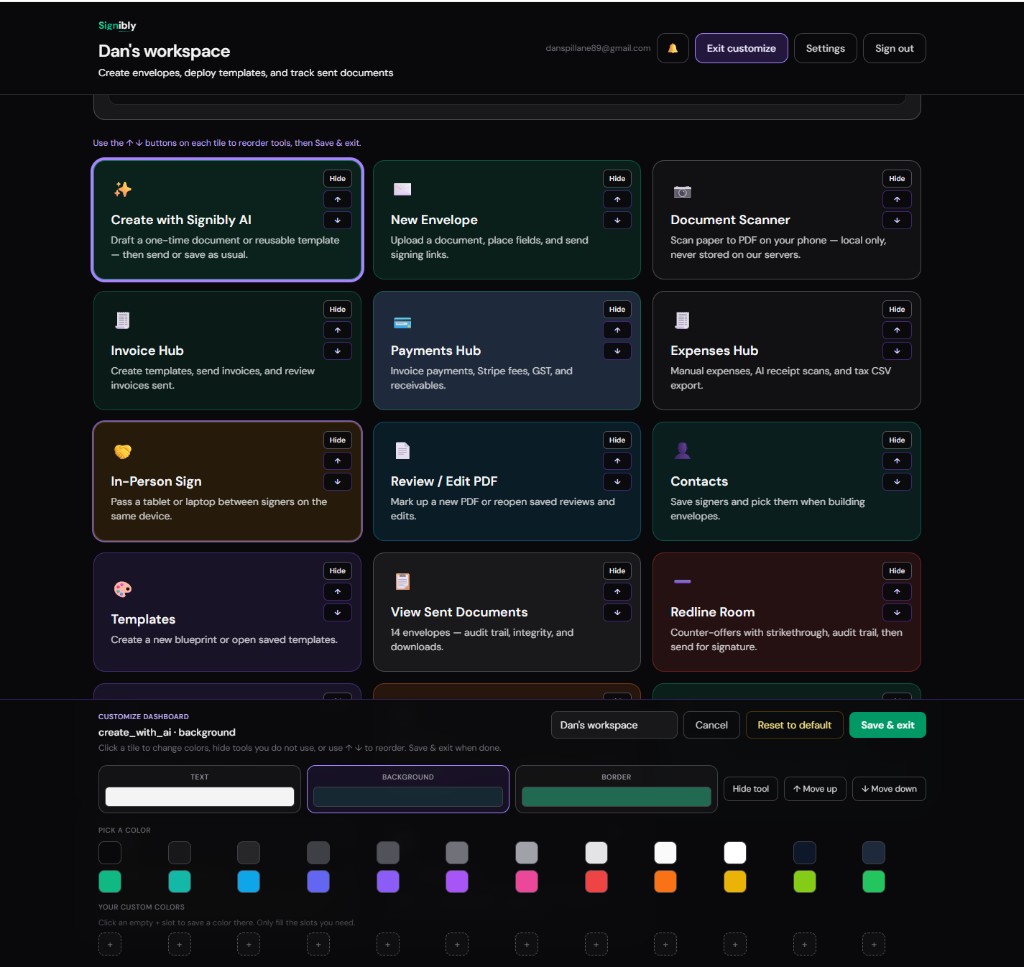
Signibly customize mode: hide hub tiles you do not need
On Signibly Business, open your dashboard, choose Customize workspace, and hide any hub tile you are not ready to use. Hidden tiles stay out of your way in normal view but can be unhidden instantly when you grow into invoicing, expenses, or tax tools.
That is the practical fix for owners who want simple software without bloat today, without locking themselves out of all-in-one value later.
Team rollout tips
Document one "default layout" screenshot for each role and share it in onboarding. People should not invent their own maze of tabs on day one.
Review layouts quarterly — the same cadence as your software bill audit. When a hidden module becomes weekly work, unhide it and update the onboarding doc.
When hiding is not enough
If a product cannot hide modules, you are paying for UI noise and often paying twice for overlap. That is a signal to consolidate vendors, not another training session.
A lean stack plus a customizable dashboard beats a single mega-suite where every tab stays visible because the vendor wants you to notice upsells.
Does hiding a hub in Signibly delete my data?
No. Hide only changes what appears on your dashboard. Invoices, expenses, and documents stay in your workspace.
Can teammates have different layouts?
Personal dashboard layouts — including hidden hub tiles — are saved per user on Business. Each teammate can focus on the modules they use without affecting others.
Related
Custom dashboards guide · Invoice Hub guide · For small business · Pricing · Shelf-ware waste · Standalone tax · Top 10 SMB software · FreshBooks vs Signibly · Track partial payments · DocuSign vs PandaDoc · AI document creation · PandaDoc vs SignNow · PandaDoc pricing 2026 · PandaDoc vs Adobe Sign · SignWell vs DocuSign · Signaturely vs DocuSign · Dropbox Sign & invoicing · eSignLive vs DocuSign · AI vs template contracts · AI fillable PDF guide · Complete document workflow · PandaDoc vs DocuSign vs Signibly · Hidden cost of five business apps · Best AI contract generators · 50 business documents checklist · AI vs lawyers for contracts · Client onboarding guide · Build a paperless business · Switch to Signibly AI · Scan receipts & invoices · Replace multiple apps · All-in-one SMB software · Freelancers · Get paid faster · Client management · Cheaper DocuSign alternative · All blog posts · All solutions · Compare vendors