The Complete Small Business Document Workflow
Enquiry, proposal, quote, contract, e-sign, invoice, payment, expenses, records, tax — the ten-stage workflow every small business runs, and how Signibly connects it in one $10/month AUD workspace.
Ten stages, one thread
Most small businesses can name the moment a deal starts (an enquiry) and the moment it is truly finished (money in the bank, expense logged, return lodged) — but almost nobody has mapped the stages in between. Enquiry, proposal, quote, contract, e-sign, invoice, payment, expenses, records, tax: ten stages, one thread, and in most SMBs, five or six different logins.
Each handoff between stages is where deals stall. A proposal sits in a CRM. A quote lives in a spreadsheet. A contract goes to a signing tool. An invoice goes to accounting software. A receipt goes to a shoebox or a separate expense app. Tax prep means exporting from everywhere in December and hoping nothing was missed.
This guide walks the full ten-stage workflow the way it actually happens for a freelancer, tradesperson, consultancy, or small agency — with a plain description of what "good" looks like at each stage, and where Signibly (from $10/month AUD) replaces two, three, or five separate tools with one connected workspace.
None of this is legal or tax advice — it is a map of the operational workflow. Always confirm contract wording and tax treatment with a qualified professional for your situation.
Stage 1: Enquiry — the moment before any document exists
Every document starts as an enquiry: a phone call, a contact form submission, a message, a referral text. At this stage there is no paperwork yet — just a person who might become a client, and a clock that starts ticking the moment they ask "how much would this cost?"
The mistake small businesses make here is treating the enquiry as informal until money is discussed. In reality, the enquiry stage sets expectations that show up later in disputes: what was promised, what timeline was implied, what price range was floated. Write it down, even briefly, the same day.
You do not need software to receive an enquiry — email and a phone are enough. What matters is a habit: capture name, contact details, what they asked for, and any number you mentioned, before you move to drafting anything. That note becomes the seed for the proposal or quote in the next stage.
Businesses that skip this step often end up reconstructing the conversation from memory when a client disputes scope three weeks later. A two-line note today saves an afternoon of guesswork later.
Stage 2: Proposal — turning an enquiry into a document
A proposal answers "what will you do for me, and why should I pick you?" before price is locked in. Not every job needs one — a two-hour handyman callout does not — but any engagement over a few hundred dollars, or with any complexity, benefits from a short written proposal that outlines scope, timeline, and assumptions.
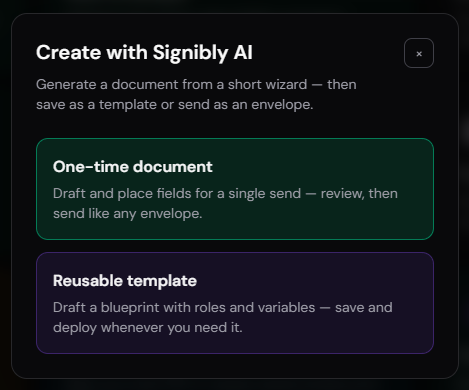
This is where Signibly AI earns its place early in the workflow, not just at the contract stage. Use the drafting wizard to generate a scope-of-work document from a short set of answers — service type, deliverables, timeline, jurisdiction — and you have a professional-looking proposal in minutes instead of a blank document late at night.
Keep proposals honest about what is not included. Vague scope is the single biggest cause of scope-creep disputes later in the relationship. A proposal that states the number of included revisions, with additional revisions billed separately, prevents an awkward conversation in month two.
Once the client verbally agrees to the proposal, you are ready to move to a quote — if pricing needs client sign-off separately — or straight to a contract, if the proposal already included firm pricing.
Templates: reuse your best documents instead of starting from zero
The first proposal or contract you draft for a new engagement type takes the longest. The tenth should take minutes, because you are not starting from a blank page — you are adjusting a template that already reflects your standard scope, your standard payment terms, and the clauses you have learned the hard way to always include.
Signibly lets you save any AI-drafted document as a reusable template, complete with its field placements. A residential tenancy agreement, a standard service agreement, a photography contract with a licensing clause — draft it once, refine it with real client feedback, then reuse it for every future client of that type without regenerating from the wizard each time.
Team accounts benefit even more: templates saved to shared Team Folders mean a new hire drafts their first client contract from an approved starting point instead of inventing their own version of "the standard agreement," which is how inconsistent terms quietly creep into a growing business.
Revisit templates periodically. A clause that made sense two years ago — a fixed late fee, a specific delivery timeline — can become outdated as pricing, regulation, or your own service offering changes. Treat templates as living documents, not something you set once and forget.
Stage 3: Quote — pricing without a spreadsheet fight
A quote formalises price. For simple engagements, the quote and the proposal are the same document. For jobs with materials, staged milestones, or optional add-ons, a dedicated quote with line items lets the client see exactly what they are paying for and choose between options.
Many small businesses still build quotes in a spreadsheet, screenshot it, and email a PDF. That works until a client asks for a revision — then the spreadsheet, the PDF, and the emailed version drift out of sync, and nobody is sure which number is final.
Signibly Invoice Hub's line-item builder doubles as a quote builder: create the line items once, mark the document as a draft, and when the client accepts, convert it directly into an invoice or attach it to the contract for signature — no retyping the same numbers into a second tool.
Quotes should carry an expiry date. Material costs and your own availability change; a quote that is technically "still open" eight months later creates arguments about which price applies when the client finally says yes.
Stage 4: Contract — from draft to a real agreement
The contract is where verbal understanding becomes an enforceable document: scope, price, payment terms, timeline, cancellation terms, IP ownership, and liability limits where relevant. This is the stage most small businesses under-invest in — either skipping it entirely on a handshake, or copying a template from a generic search result that does not match their jurisdiction or engagement type.
Signibly AI drafts from a structured wizard rather than a single vague prompt: document type (service agreement, NDA, residential tenancy, and more), party roles, jurisdiction, length, tone, and optional clauses. The output is a laid-out draft with a clear structure, not a chat transcript you have to reformat yourself.
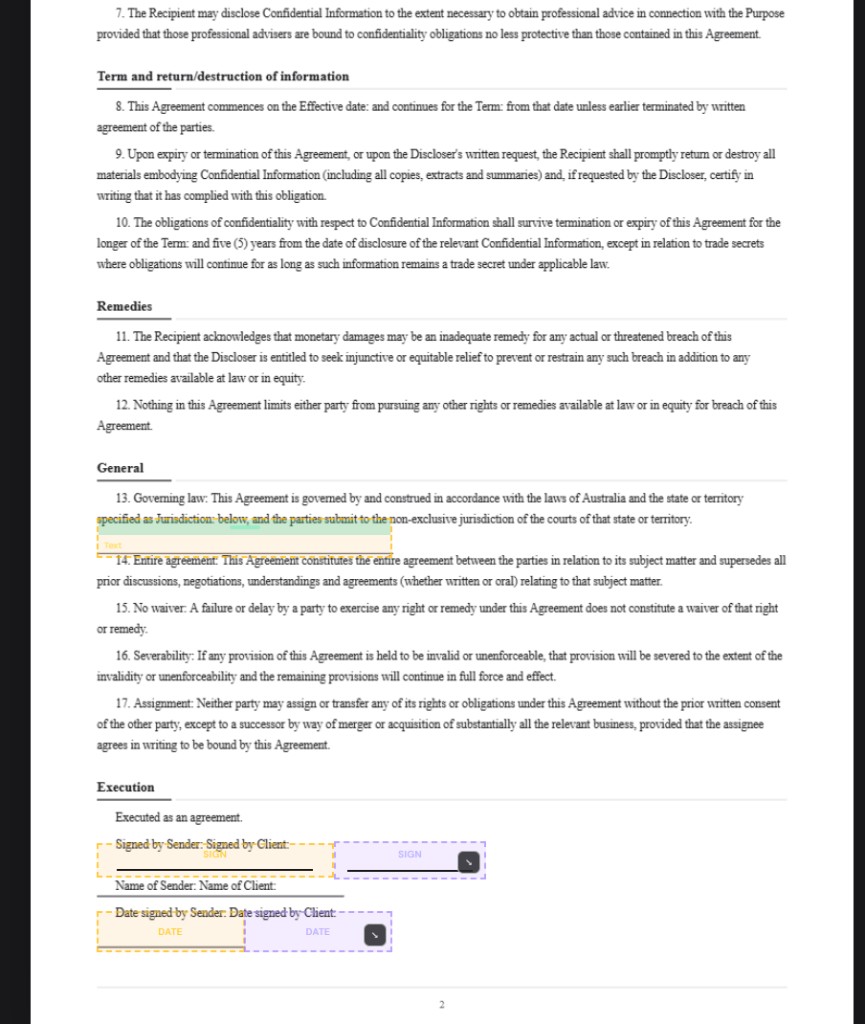
If a lawyer or counterparty already sent you a finished PDF, you are not stuck re-typing it — Signibly AI can auto-place signature and form fields on an uploaded PDF, scanning up to 20 pages in high-detail batches so multi-party contracts with repeated "Client" blocks are separated into Client 1, Client 2, and so on automatically.
Review every AI-drafted clause before sending. Signibly AI is not a solicitor and does not replace legal review for complex, regulated, or high-value agreements — treat it as a fast, structured first draft, not a final legal opinion.
Request revisions inside the same workspace rather than emailing redlines back and forth as separate attachments — the first round of AI revisions is included, keeping the contract and the eventual signing envelope in one place.
Stage 5: E-sign — collecting signatures without chasing
A contract that is not signed is just a document. This stage is where most delay creeps in: PDFs printed and scanned, signatures collected over email attachments, or one party forgetting to send their half back. Electronic signatures exist specifically to remove that friction.
Before sending, test every signer role in Signibly's prepare workspace — preview the document exactly as "Client," "Provider," or "Witness" would see it, without waiting for a real signer to complete their part first. This catches misplaced fields before a client ever opens the email.
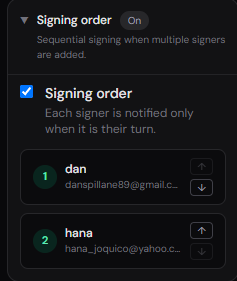
Set a signing order when sequence matters, add SMS alerts for time-sensitive agreements, and use e-witness features when your jurisdiction or document type requires a countersignature from someone who is not a party to the deal.
Once every party has signed, the completed PDF and its full audit trail — who signed, when, from what IP — are stored automatically. That audit trail matters more than people expect if a dispute ever surfaces months later.
This is also the natural point to attach or trigger the invoice: many small businesses require a deposit at signing, which flows straight into the next stage.
Multi-party and multi-signer complexity
Not every agreement has exactly two signers. A residential tenancy might need signatures from two or three tenants, a landlord, and sometimes a guarantor. A partnership agreement might involve four founders. A construction contract might need a client, a builder, and a certifying witness. Handling this cleanly is where many signing tools start to feel clumsy.
Signibly AI assigns distinct colours to each party role during drafting and field placement, and automatically separates repeated blocks — three "Tenant" signature lines on an uploaded lease become Tenant 1, Tenant 2, and Tenant 3, each mapped to a different colour so nobody has to guess which blank belongs to which person.
Signing order matters more than people expect in multi-party documents. A guarantor should typically not be asked to sign before the primary tenant has agreed to terms; a witness should sign after the party they are witnessing, not before. Configure the order once per template and it applies automatically to every envelope built from it.
Test every role before sending a multi-party envelope for real. A field accidentally assigned to the wrong party is a much bigger problem to unwind after three of four people have already signed than before the first email goes out.
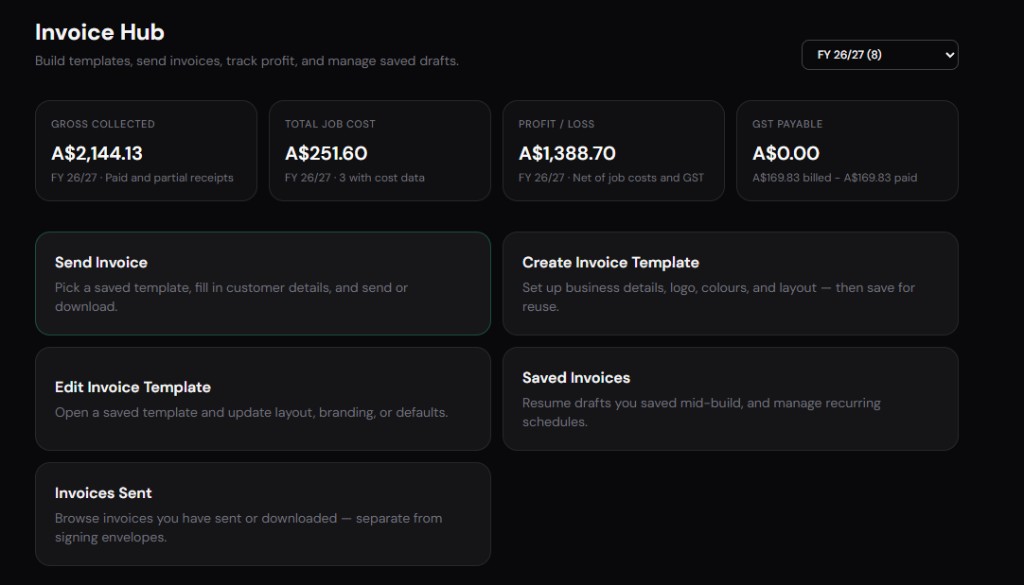
Stage 6: Invoice — the moment cash flow starts
A signed contract with no invoice attached is a job that has not started getting paid. The invoice should go out the same day the contract completes — not sometime that week once you remember. Delay here is one of the most common, most fixable causes of slow cash flow in small business.
Invoice Hub lets you build the invoice from the same client record used for the contract — no retyping name, ABN, or address into a second system. Reusable line-item templates and canvas layouts mean a recurring engagement's invoice takes seconds, not a fresh document every month.
Decide deposit-versus-pay-in-full terms before the job starts, not after. A clear deposit line on the original proposal makes the invoice a formality instead of a negotiation.
Recurring invoices for retainer clients should be scheduled, not manually recreated. Missing a monthly invoice because nobody remembered is a quiet but real source of lost revenue for service businesses.
Stage 7: Payment — getting the money, not just the invoice
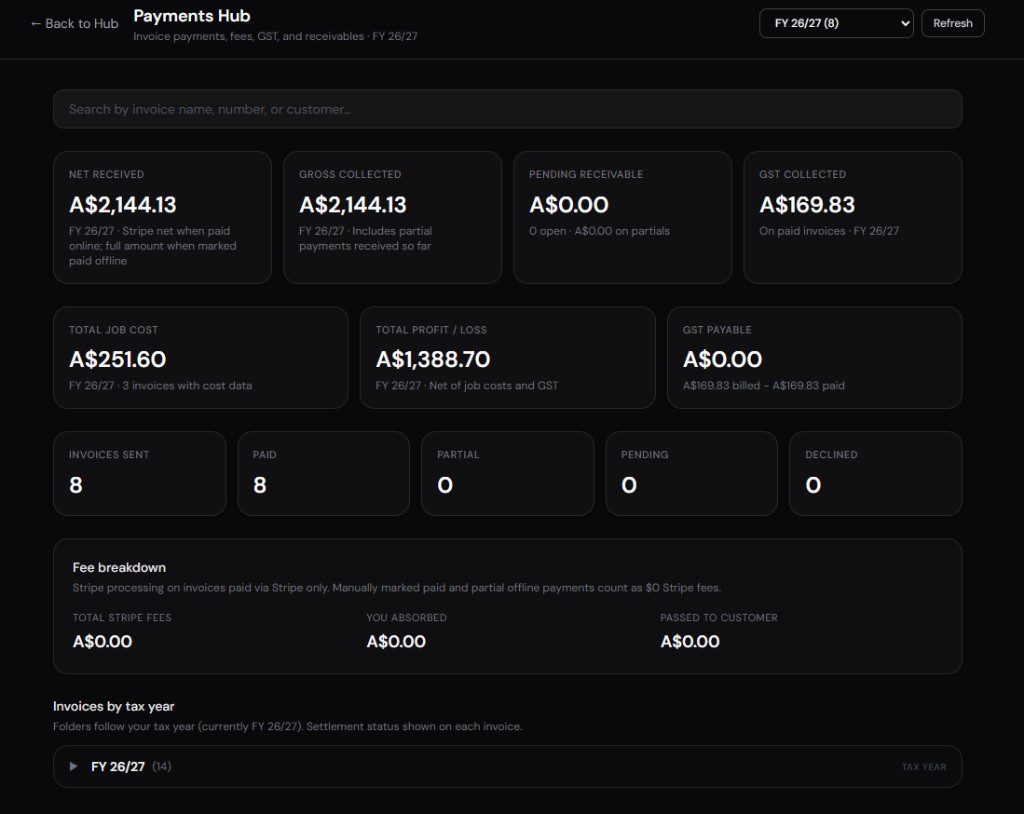
Sending an invoice is not the same as getting paid. This stage is about visibility: who has paid, who has partially paid, and who is overdue — without opening a spreadsheet to reconstruct the answer from bank statements.
Payments Hub tracks card payments, partial payments, and manually recorded offline transfers (bank transfer, cash, cheque) in one dashboard, so a client who pays half by bank transfer and half by card still shows an accurate remaining balance.
Offer more than one payment method where you can. Clients who are asked to just do a bank transfer sometimes delay for a week; a payment link on the invoice that accepts card payment removes the excuse and gets money moving the same day.
Chase overdue invoices early and politely — a short reminder at three days overdue prevents the slide into thirty, sixty, ninety days that is genuinely hard to recover from without damaging the client relationship.
Recurring engagements and retainer workflows
Not every client relationship ends when the contract is signed. Retainer clients, maintenance contracts, and subscription-style service agreements keep running for months or years after the initial signature — and the invoice stage has to repeat reliably without anyone remembering to trigger it manually every time.
Signibly's recurring invoice scheduling handles the repetition: set the cadence once against a retainer agreement, and the invoice generates and sends automatically on schedule, using the same line items and client record established at signing. Nobody has to remember "it is the first of the month, time to invoice Client X."
Retainer agreements should still be reviewed periodically — scope drifts, hours worked can creep above what was originally agreed, and a fixed retainer fee that made sense a year ago may no longer reflect the actual workload. Build an annual or biannual review clause into the original contract so renegotiation is expected, not awkward.
When a retainer client eventually wants a one-off project outside the standard scope, treat it as its own mini-workflow — a fresh proposal and quote, even if the contract and invoicing happen inside the same long-running client record.
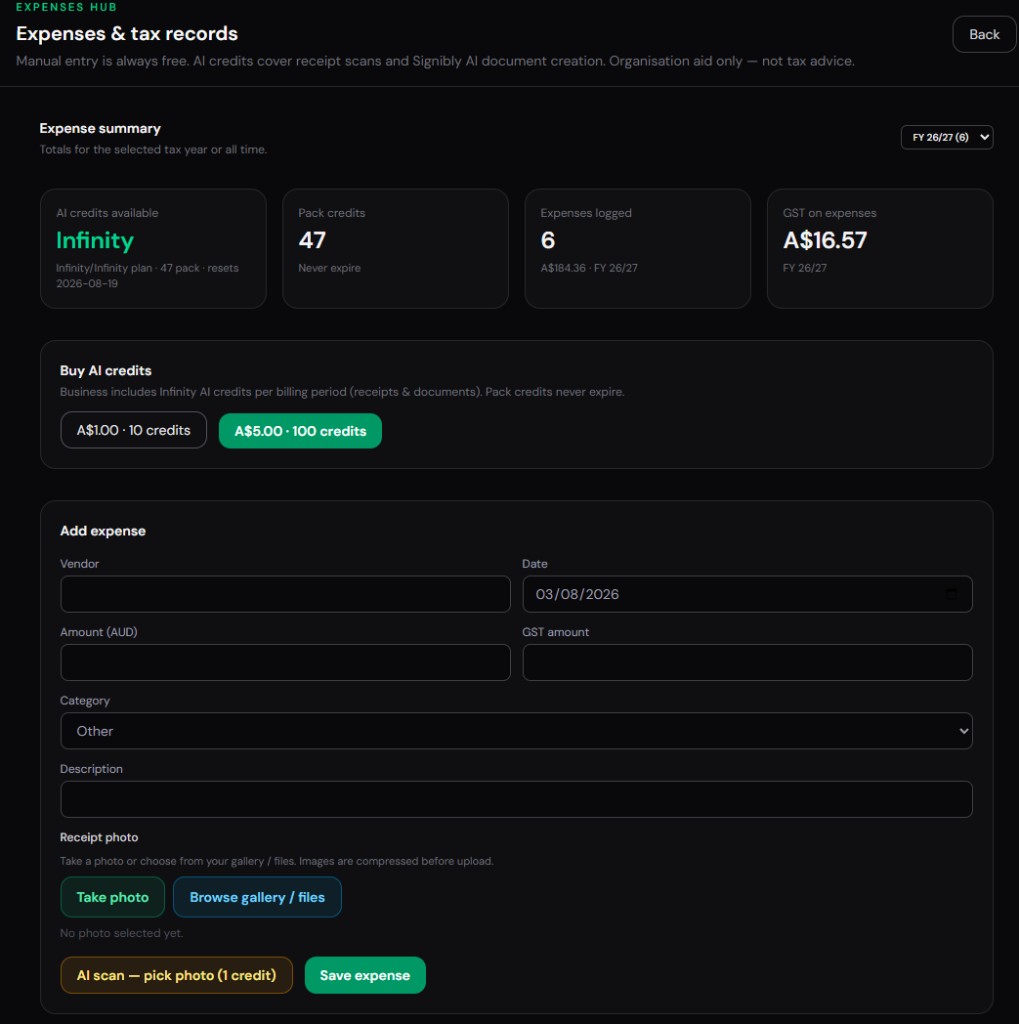
Stage 8: Expenses — the half of the ledger everyone forgets
Every business tracks what comes in far more carefully than what goes out. Materials, subcontractors, software subscriptions, fuel, and small tools all erode margin quietly if they live in a shoebox of receipts instead of a running total next to the job they belong to.
Expenses Hub pairs manual entry with AI receipt and invoice scanning — photograph a receipt or invoice and let AI extract merchant, amount, date, and category instead of typing it manually. On Signibly Business, receipt and invoice scans draw from the same monthly AI credit pool used for document drafting and field placement.
Tag expenses to the job or client they belong to wherever possible. That single habit is what turns "did we make money on that job" from a guess into an answerable question — critical for trades and project-based consultancies where margin varies wildly by job.
Expenses matter for tax deductions as much as for job profitability. A receipt or invoice photographed and categorised the day it happens is worth more at tax time than a pile reconstructed from memory months later.
Stage 9: Records — where files go to survive an audit
Every stage above produces a document: the proposal, the quote, the signed contract, the invoice, the payment receipt, the expense receipt. Records is the stage that asks — if you needed any one of these in eighteen months, for a dispute, an audit, or simply to answer a client's question, could you find it in under a minute?
Signed documents in Signibly carry their own audit trail and completion certificate automatically, so the "who signed what and when" question is answered without digging through email. Google Drive archive integration extends that by syncing completed documents into folders you already use for client records.
Consistent naming and folder structure matter more than any single tool. Client name, job reference, and date in the file name beats a folder that nobody has opened since it was created.
Retention periods vary by document type and jurisdiction — some tax and employment records must be kept for several years. Check the requirements that apply to your business and industry rather than assuming a default.
Handling scope changes and variations mid-project
Almost every project of any length runs into a moment where the client asks for something not in the original agreement — an extra revision round, a bigger deliverable, materials that turned out to cost more than quoted. How you handle that moment determines whether the workflow stays clean or turns into a dispute.
The discipline that protects both sides is simple: any material scope change gets its own short variation document, even if it is just a paragraph, signed by the same parties as the original contract. Verbal agreement to "just add it on" is exactly the kind of thing that becomes a dispute months later when the final invoice arrives higher than expected.
Signibly AI can draft a short variation or addendum from the same wizard used for the original contract, referencing the original agreement by name and date. Send it for signature the same way, and it becomes part of the same client record rather than a separate email thread that gets lost.
Update the invoice or quote to reflect the variation once it is signed — not before. Invoicing for additional scope before the client has agreed to it in writing is a fast way to turn a minor misunderstanding into a real payment dispute.
Stage 10: Tax — turning the year into a return
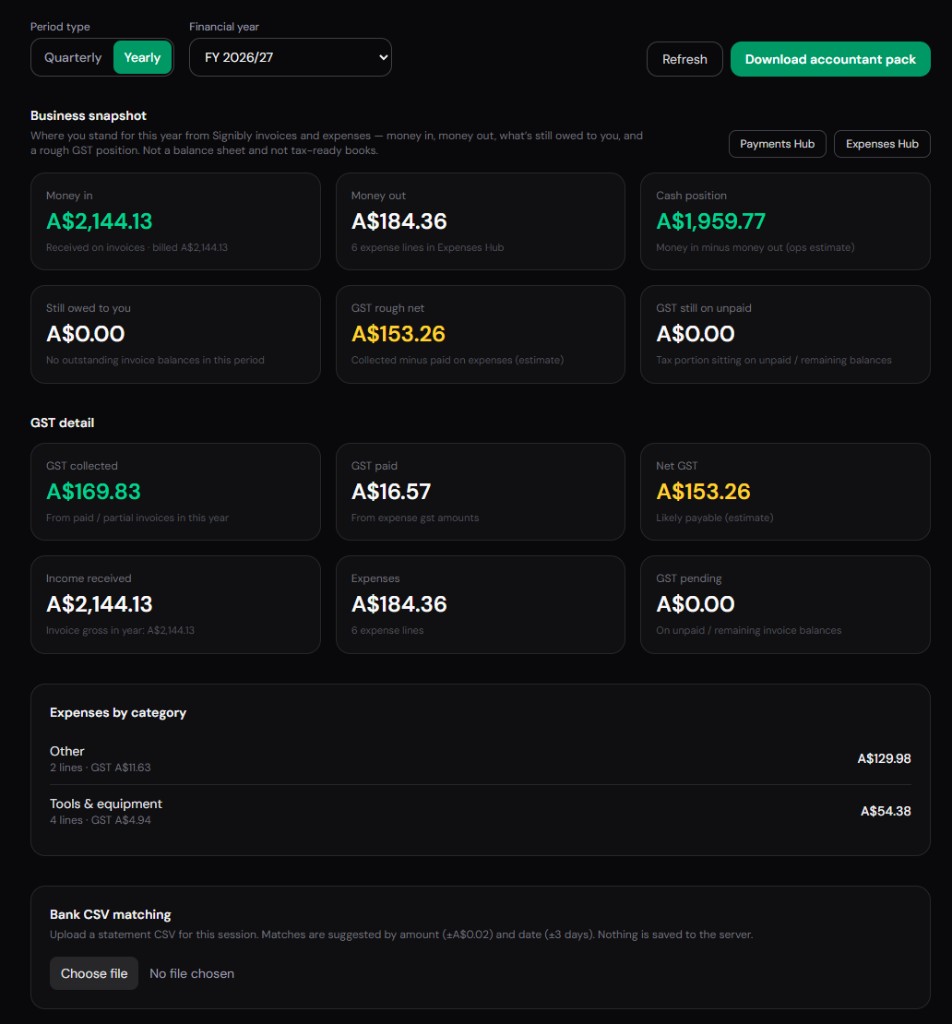
Tax preparation should be a summary of the year, not an archaeology project. If enquiry through expenses have been tracked consistently, the tax stage is mostly export and review — not reconstruction.
Tax / BAS Hub pulls invoice and expense data into period summaries — useful for quarterly BAS-style reporting in Australia and for handing your accountant a clean picture at year end, including an accountant-ready export pack.
Signibly does not lodge returns or BAS with the tax office on your behalf, and this is not tax advice — your accountant or registered tax agent still reviews and lodges. What the platform does is remove the "find everything from five apps" step that eats a week of every financial year end.
GST or sales-tax treatment, deduction eligibility, and entity structure are all decisions for a qualified accountant, especially as a business grows past sole-trader simplicity. Treat the platform's summaries as a starting point for that conversation, not a final answer.
Team workflows: who touches which stage
Solo operators run every stage themselves, which keeps things simple but means the whole workflow stops when they are unavailable. Growing teams need to decide, deliberately, who owns each stage — because "whoever gets to it first" is how enquiries go unanswered and invoices go unsent for a week.
A typical small team split looks like: sales or the owner handles enquiry and proposal, operations or the owner handles contract and e-sign, admin or bookkeeping handles invoice and payment tracking, and whoever incurs the expense logs the receipt at the time it happens rather than batching it for someone else to chase later.
Signibly's team permissions let you control who can send envelopes, who can issue invoices, and who can see payment and expense data — useful when a junior team member should be able to draft and prepare documents but a manager should be the one who actually sends client-facing agreements or issues significant invoices.
Shared Team Folders and templates matter here too: a consistent set of approved documents means the workflow does not depend on any one person remembering the "right" version of a contract or invoice layout.
What happens when a client wants to negotiate terms
Negotiation is normal and healthy — a client questioning a payment schedule or asking for a clause to be softened is not a red flag, it is part of reaching an agreement both sides will actually honour. The workflow problem starts when negotiation happens over email or a phone call and nobody updates the actual document to reflect what was agreed.
Keep negotiation changes inside the document, not scattered across a side email thread. Use Signibly's revision workflow to update the AI-drafted contract directly, so the version sent for signature is the version that was actually negotiated — not an earlier draft with a verbal amendment nobody wrote down.
Set a reasonable limit on free-form negotiation before it starts. A proposal that states standard terms and a brief process for requesting changes prevents every engagement from becoming an open-ended back-and-forth that delays the whole downstream workflow by weeks.
Once terms are finalised, treat the signed contract as the single source of truth for every later stage — the invoice, the payment schedule, and any future variation should all trace back to what was actually signed, not to an earlier draft or a remembered conversation.
International and multi-jurisdiction clients
Freelancers and agencies increasingly work with clients across borders — an Australian consultant billing a US client, a UK agency contracting an Australian subcontractor. Jurisdiction affects contract wording, tax treatment, and even which currency a quote and invoice should be issued in, and getting this wrong causes friction at exactly the stages this guide covers.
Specify jurisdiction explicitly at the contract drafting stage rather than assuming it is obvious. Signibly AI's wizard asks for jurisdiction directly so the drafted agreement reflects the legal framework you actually intend to apply, rather than defaulting to whichever jurisdiction happens to be most common in generic templates.
Invoicing across currencies and tax regimes is where many small businesses still fall back to manual spreadsheets. Confirm how your invoicing tool handles foreign currency display and GST or sales-tax treatment for cross-border clients before assuming your existing templates apply cleanly — this is genuinely one area where a conversation with your accountant early is worth more than guessing.
None of this replaces advice from a professional familiar with cross-border contracting and tax obligations in both relevant jurisdictions — treat the workflow tools as making the paperwork easier to execute correctly once you know what "correctly" means for your specific situation.
Backup plans: what if a tool goes down
Every software product, including Signibly, can experience downtime or an outage. Relying entirely on any single platform for a client-facing deadline without a fallback plan is a risk worth acknowledging honestly rather than assuming it will never happen to you.
For time-sensitive signings — a deal closing at end of month, a lease that must be signed before a move-in date — build in a small time buffer rather than sending the envelope at the last possible hour. A day of slack absorbs almost any temporary platform issue without putting the deal at risk.
Keep local copies of critical signed documents rather than relying solely on cloud storage inside any one platform. Google Drive archive integration helps here by syncing completed documents automatically, but a periodic manual export of anything mission-critical is a reasonable extra layer of protection for a small business with no IT department to manage backups.
This is not a reason to avoid consolidating your workflow — a fragmented five-tool stack has five separate points of potential failure instead of one, which is arguably a bigger risk, not a smaller one. It is simply a reason to keep sensible backups regardless of which tools you use.
A week in the life: watching all ten stages run
Monday: a referral sends a message asking for a quote on a small renovation job. You note the enquiry, then draft a proposal with Signibly AI that afternoon outlining scope and assumptions.
Tuesday: the client accepts by text. You convert the proposal into a formal quote with line items for materials and labour, and send it for review.
Wednesday: the quote is accepted. You generate the service agreement from the same wizard, drop in a milestone payment schedule, and send it for e-signature with a deposit invoice attached.
Thursday: the contract is signed, the deposit invoice is paid via the card link. You start the job and photograph the first materials receipt on the way to the site.
The following weeks: as expenses come in, they are logged against the job in seconds. When the job finishes, the final invoice goes out the same day, tracked in Payments Hub until it clears — and every document from the original enquiry note through to the final receipt sits under one client record, ready for the quarterly summary.
Getting your team or clients to actually adopt the new workflow
A better workflow only helps if people actually use it. The most common failure mode when consolidating tools is not choosing the wrong platform — it is rolling it out without a clear cutover point, so staff keep half-using the old spreadsheet or the old signing tool out of habit while nominally "using" the new one.
Pick a clean start date for new engagements — every new client from that date forward goes through the new workflow end to end, while existing in-flight engagements finish out on whatever system they started on. Running two systems in parallel indefinitely recreates exactly the fragmentation problem you were trying to remove.
Client-facing changes need a light touch, not a lengthy explanation. Most clients do not care which platform sent their contract or invoice as long as it looks professional and works smoothly — a short, friendly note that "our new system might look slightly different" is usually enough, without turning your own process change into their problem to absorb.
Revisit adoption after a month, not just at launch. It is normal for a habit to slip in week two once the initial enthusiasm fades — a quick check that everyone is still using the new workflow for new engagements catches backsliding before it becomes the new normal.
Client-facing polish across every stage
Every document a client sees — proposal, quote, contract, invoice — is also a small piece of your brand. A proposal typed in plain email text next to a beautifully designed invoice sends a mixed signal about how carefully the rest of the engagement will be run, even if the actual work is excellent.
Signibly lets you drop a logo and apply consistent branding across AI-drafted documents, invoice templates, and the signing experience itself, so a client moving from proposal to contract to invoice sees one consistent, professional presentation rather than a patchwork of different tools with different fonts and different senders.
This matters more for newer or smaller businesses than owners often assume. A polished, consistent document trail is one of the few signals a first-time client has to judge professionalism before the actual work begins — and inconsistency across five different tools quietly undermines trust before a single deliverable is produced.
Consistency compounds with referrals too. A client who received a clean, professional paper trail is far more likely to describe you as "easy to work with" to the next referral than one who received a jumble of PDFs, spreadsheets, and email threads with different formatting each time.
Seasonal cash-flow planning across the ten stages
Many small businesses experience seasonal swings — trades slow down over winter, retail spikes before holidays, consultancies see enquiry drops in January. Watching the full workflow end to end makes these patterns visible months before they hit the bank account, instead of being discovered only when cash gets tight.
A dip in enquiries this month is an early warning about invoices two months from now and payments three months from now, if your typical cycle from enquiry to payment runs that long. Businesses that only watch their bank balance find out about a slow season after it has already arrived; businesses watching the enquiry stage find out before it does.
Use the quieter periods for the parts of the workflow that get neglected when things are busy — updating templates, reviewing which clients are consistently slow to pay, clearing the expense backlog, and confirming that your tax and BAS summaries actually reconcile with what your accountant expects to see.
Building a habit of reviewing all ten stages monthly, not just the invoice total, is what turns seasonal swings from a surprise into a plannable, expected part of running the business.
Why the fragmented version of this workflow costs more than it looks
Run the same week with five separate tools — a CRM for the enquiry, a word processor for the proposal, a spreadsheet for the quote, a signing tool for the contract, accounting software for the invoice, a separate payment processor, an expense app for receipts, cloud storage for records, and a bookkeeper working from their own system for tax — and the cost is not just the combined subscription total.
It is the retyping: the client's name and business number entered five times across five systems, the price copied from quote to contract to invoice manually, each copy a chance for a typo that becomes a real dispute.
It is the context switching: closing one tool to open another to open a third, each with its own login, its own search box, its own idea of what a "client" record looks like.
And it is the audit gap: when a client disputes a charge months later, reconstructing the full paper trail — proposal, contract, invoice, payment, receipt — means logging into four or five different accounts and hoping none of them archived the record you need.
The stack most small businesses run instead — and what it costs
Sticker prices change constantly and vary by plan and region — treat the figures below as directional, and confirm current pricing on each vendor's site before comparing to your own stack.
| Workflow stage | Typical separate tool | Signibly Business ($10/mo AUD) |
|---|---|---|
| Proposal & contract drafting | Word processor + separate AI writer | Signibly AI wizard, included credits |
| E-signature | Dedicated e-sign tool, ~$15–45 USD/mo | Unlimited envelopes under fair use |
| Invoicing | Accounting software, ~$20–35 USD/mo | Unlimited invoices under fair use |
| Payment collection | Separate processor fees + dashboard | Payments Hub, processor fees only |
| Expense & receipt tracking | Receipt and invoice scanner app, ~$5–18 USD/mo | Expenses Hub + AI receipt and invoice scans |
| File / record storage | Cloud storage, separate plan | Google Drive archive integration |
| Tax / BAS summaries | Manual export from every tool | Tax / BAS Hub period summaries |
| Approx. combined monthly cost | $150–250+ USD/mo across tools | From $10/mo AUD (~$6.50 USD) |
What consolidating the workflow actually saves
The financial saving is real but usually secondary to the time saving. Ask any owner who has switched from five logins to one what they noticed first, and it is rarely the invoice total — it is not having to remember which tool holds a particular client's contract.
Time saved compounds. Minutes not spent retyping a client's details into a fourth system, multiplied by every new client, every quarter, adds up to hours reclaimed for the actual work that generates revenue.
Error reduction is the quieter benefit. A price typed once into a quote and inherited by the contract and invoice cannot drift out of sync the way three manually retyped copies can.
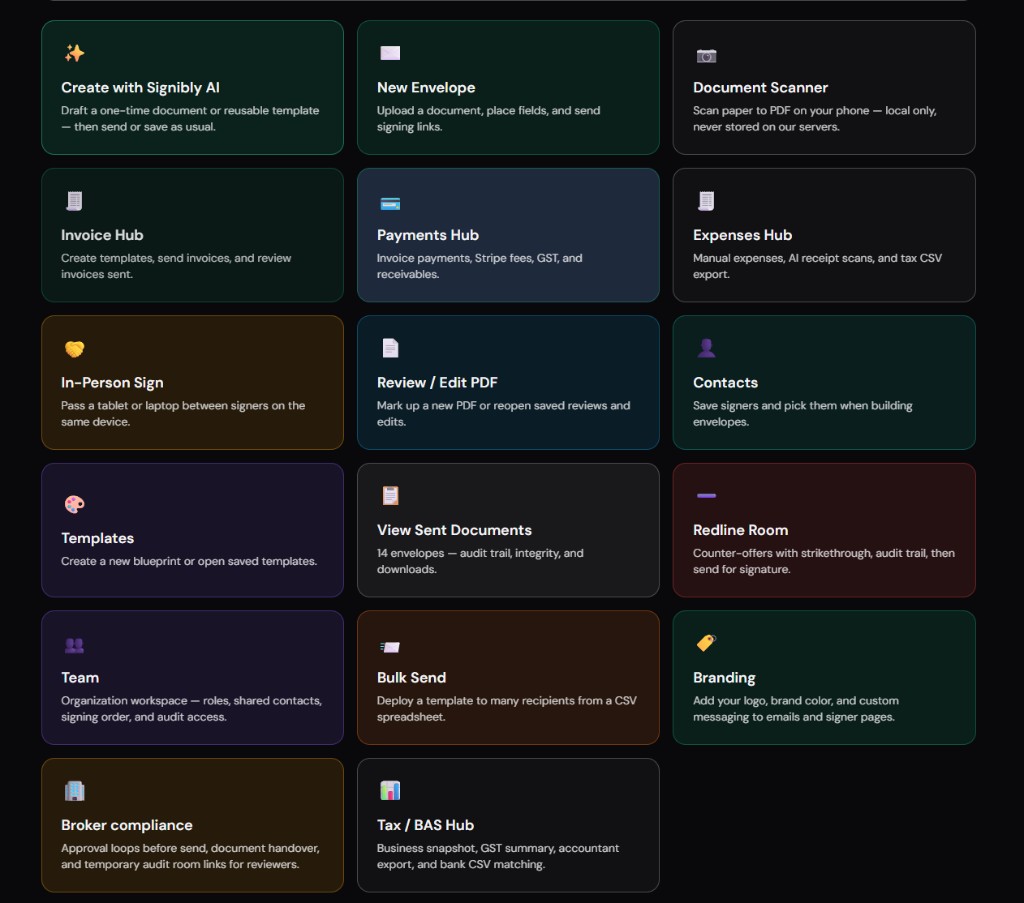
None of this means every business needs every hub on day one. Signibly's dashboard lets you hide hub tiles you are not using yet — start with e-signatures, turn on Invoice Hub when you are ready, add Expenses Hub and Tax / BAS Hub as the business grows into needing them.
Metrics worth tracking across the ten stages
Once the whole workflow lives in one connected workspace, a handful of simple metrics become genuinely visible instead of requiring a manual spreadsheet reconstruction: average days from enquiry to signed contract, average days from contract signed to invoice sent, average days from invoice sent to payment received, and expense total versus invoice total per job.
The enquiry-to-signature gap tells you how much friction exists in your own sales process — a gap of two weeks when the actual work of drafting and reviewing takes two days suggests something is stalling, often simply because nobody owns follow-up.
The invoice-to-payment gap is the number most directly tied to cash flow. A business that reliably collects within seven days can plan very differently than one that averages forty-five, even if their total revenue is identical on paper.
Job-level profit — invoice total minus tagged expenses — is the metric trades and project-based businesses most often skip, usually because expenses are not tagged to a job at all. Once they are, it becomes possible to spot which job types are quietly unprofitable before you take on ten more of them.
A note on pricing transparency across the ten stages
One quiet advantage of running the whole workflow in one place is that pricing becomes easier to reason about honestly. When e-signature, invoicing, payments, and expenses are five separate line items on five separate bills, it is genuinely difficult to know what "running the business administratively" actually costs each month without deliberately adding it up.
Signibly publishes one number for the Business plan — $10/month AUD, with extra team seats at the same flat rate — rather than a tiered structure that requires calculating your own usage against volume bands to estimate a real bill. Free stays at $0/month with capped envelopes and a single manual invoice, enough to genuinely trial the core signing experience before committing to a paid plan.
That transparency matters most for businesses in their first year, when every recurring cost needs to be justified against genuinely tight cash flow — a single predictable line item is easier to budget against than five variable ones that might each creep upward independently at their own renewal dates.
Where the workflow still needs a human
No platform, including Signibly, replaces judgment at every stage. Complex contracts — anything with unusual liability terms, IP assignment across jurisdictions, or regulated industries — deserve a lawyer's review, not just an AI draft.
Tax and BAS treatment depends on your entity structure, industry, and jurisdiction. Tax / BAS Hub produces summaries; a registered accountant or tax agent still makes the calls that matter and lodges on your behalf.
Client relationships are not automatable. The workflow above removes friction from paperwork so you have more time for the parts of the job that actually require a person — the site visit, the difficult conversation about scope, the follow-up call that saves a wobbling client relationship.
Treat every AI-drafted clause, every auto-placed field, and every generated summary as a strong first draft produced quickly — then apply the judgment that only you, or your professional advisors, can provide.
Choosing a signing method for the situation
Not every document needs the same signing ceremony. A low-stakes internal acknowledgement might reasonably use a simple click-to-sign flow, while a high-value contract or anything requiring a witness benefits from signing order, identity verification steps, and an e-witness feature that records a countersignature from someone who is not a party to the agreement.
In-person signing has its own place in this workflow — a tenancy inspection, a point-of-sale agreement, or a site visit where the client is physically present. Signibly's in-person sign mode lets you hand a device to the client on the spot rather than emailing a link and waiting, useful for trades and property businesses that often close the deal face to face.
SMS alerts matter most for time-sensitive agreements where email alone risks being missed — a lease that must be signed before a specific date, or a contract tied to a narrow window like an auction settlement. Matching the signing method to the actual stakes and urgency of the document, rather than defaulting to the same flow every time, is a small habit that reduces delay across the whole workflow.
Whatever method you choose, the completed document should end up in the same place as every other signed agreement — a scattered mix of in-person paper signatures, emailed PDFs, and properly tracked e-signature envelopes recreates the exact records problem this guide is trying to solve.
Common mistakes at each stage — a quick recap
Enquiry: not writing anything down until money is discussed, then reconstructing the conversation from memory when a dispute arises. Proposal: leaving scope vague enough that "extra work" and "included work" become a matter of opinion instead of a written line item.
Quote: no expiry date, so a stale price becomes an argument months later. Contract: skipping it entirely on a handshake, or using a generic template that does not match the jurisdiction or engagement type. E-sign: sending without testing every signer role first, then discovering a misplaced field after the client has already opened the email.
Invoice: delaying it "until this week" instead of the same day the contract completes. Payment: offering only one payment method and then waiting a week for a bank transfer that a card link would have collected same-day. Expenses: letting receipts pile up in a shoebox instead of logging them the day they happen.
Records: inconsistent file naming that makes "find the contract from that job in March" a ten-minute search instead of a ten-second one. Tax: treating the financial year end as a scramble instead of an export, because the previous nine stages were never tracked consistently in the first place.
Starting your own version of this workflow
You do not need to migrate all ten stages at once. Start wherever the pain is worst — usually e-signature chasing or invoice chaos — and add the next hub only once the current one is a habit.
Signibly's Free plan lets you try core signing without a credit card; Business unlocks unlimited envelopes and invoices under fair use, plus Invoice Hub, Payments Hub, Expenses Hub, and Tax / BAS Hub from $10/month AUD, with a monthly AI credit pool for drafting and receipt and invoice scans.
Map your own ten stages this week — even on paper. Most owners are surprised how many tools they currently touch for a single client engagement, and how much of that could live in one connected record instead.
Do I need every hub from day one?
No — start with whichever stage causes the most friction today (usually e-signature or invoicing) and turn on additional hubs as you grow. Signibly's dashboard lets you hide tiles you are not using yet.
Is Signibly AI a substitute for a lawyer or accountant?
No. It drafts practical commercial documents and produces expense and tax summaries quickly, but complex contracts and all tax filing decisions still need qualified legal and accounting review.
What does the whole workflow cost on Signibly?
Free is $0/month for trying core signing. Business is from $10/month AUD with unlimited envelopes and invoices under fair use, a monthly AI credit pool, and Invoice Hub, Payments Hub, Expenses Hub, and Tax / BAS Hub included.
Can I still use my existing accounting software?
Yes — Tax / BAS Hub is designed to hand your accountant clean summaries and exports; it does not require you to abandon existing bookkeeping software, though many small teams find they need fewer separate apps once invoicing and expenses live in one place.
Related
Signibly AI guide · Invoice Hub · Payments Hub · Expenses Hub · Tax / BAS Hub · All-in-one small business software · Contracts + invoices hub · Pricing · Shelf-ware waste · Standalone tax · Hide unused features · Top 10 SMB software · FreshBooks vs Signibly · Track partial payments · DocuSign vs PandaDoc · AI document creation · PandaDoc vs SignNow · PandaDoc pricing 2026 · PandaDoc vs Adobe Sign · SignWell vs DocuSign · Signaturely vs DocuSign · Dropbox Sign & invoicing · eSignLive vs DocuSign · AI vs template contracts · AI fillable PDF guide · PandaDoc vs DocuSign vs Signibly · Hidden cost of five business apps · Best AI contract generators · 50 business documents checklist · AI vs lawyers for contracts · Client onboarding guide · Build a paperless business · Switch to Signibly AI · Scan receipts & invoices · Get paid faster · Invoicing with e-signatures · Replace multiple apps · Custom dashboards · All blog posts · All solutions · Compare vendors